Separate Compilation
Big software projects are typically split among multiple files. Helper functions might be separated from main, grouped together as a library of functions which accomplish related tasks using header files.
Header Files
Header files specify declarations and a separate .c source file will contain definitions for those functions declared in a .h header file.
Different files used within one program communicate using header files (.h files) to group declarations, then #include them into appropriate files. There are two ways to include files:
#include <stdio.h>is used when the header files are part of the standard library#include "myHeader.h"used for user defined header files.
When the pre-processor sees a #include directive, it inserts the content of the specified files at that location in the code.
function.c:
#include "functions.h" //including my own header file (use " ")

float func1 (int x, float y) {
	return x+y;
}

int func2 (int a) {
	return 2*a;
}
function.h:
float func1 (int x, float y);
int func2 (int a);
mainFIle.c:
#include <stdio.h>
#include "functions.h"

int main() {
	printf("%.f %d", func1(2,3.0), func2(7));
	return 0;
}
You must compile both of the c files by gcc mainFile.c function.c.
Compilation and Linking
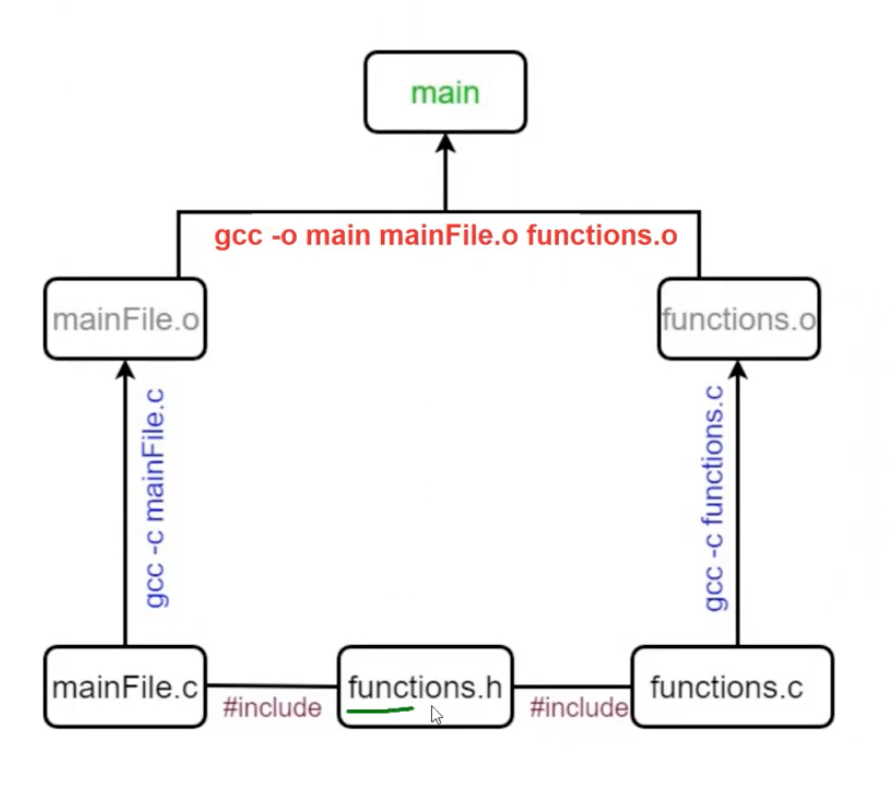 Compiling translates source files (
.c files) into intermediate object files.
gcc -c mainFile.cgcc -c functions.c
Linking combines .o files into one executable file called a.out.
gcc mainFile.o functions.o -o main
This is an advantage because by compiling separately you don't need to compile every single file, which could be hundreds. You only need to compile the .c file that you changed and link the files together.
Header Guards
Always include header guards when making our own .h files that include definitions. They prevent compile time error by preventing definition duplication when multiple .c files include the same .h file.
Example header guard for a file named rectangle.h:
// change the all-caps name to match the file name
// in this case, file is named rectangle.h
#ifndef RECTANGLE_H
#define RECTANGLE_H

struct rectange {
	int height;
	int width;
};

#endif
If a.h includes b.h, and main.c includes a.h and b.h, then b.h is included twice, causing an error. Header guards prevent this.
make and Makefile
make is an automated building tool helps you keep track of which files have been changed and need to be` recompiled. This saves time, avoids headaches from forgetting to recompile code, and reduces typing.
To use, make a configuration-type file called Makefile (or makefile). Specify which files depend on which other files, and which command should be used to create them.
There are many strict rules:
- Lines that begin with
#are comments. $operator defines symbolic constants.- e.g.
CFLAGS=-STD=C99 -pedantic -Wall -Wextracan now be referred to in a command with${constant-name). e.g.$(CFLAGS).
- e.g.
- Tabs and spaces are different.
- The first (topmost) target listed is the default target to run
- Format of a Makefile rules:
target_name>: <list of files on which target depends.>- *tab followed by command-line instruction to generate target.
- Multiple targets can be triggered by making a single target.
- If you make target
main, then first any files on whichmaindepends on will be re-made if not up-to-date.
- If you make target
Example
Makefile:
CC=gcc
CFLAGS=-std=c99 -pedantic -Wall -Wextra

main: mainFile.o functions.o
	$(CC) -o main mainFile.o functions.o

mainFile.o: mainFile.c functions.h
	$(CC) $(CFLAGS) -c mainFile.c

functions.o: functions.c functions.h
	$(CC) $(CFLAGS) -c functions.c

clean:
	rm -f *.o main
Commands to type at command prompt:
make functions.o or make mainFile.o
- Individually compiles/re-compiles the object file,
function.c(ormainFile.c), if needed, to createfunction.o(ormainFile.o) - Recompiling is needed if either the
.cor.hfile has changed, since thefunctions.o/mainFile.otarget lists both files in its dependency list. - Not really helpful or needed.
make main
- Links/re-links
mainFile.oandfunctions.oto create an executable we namedmain(from the-oflag). - First it checks if
mainFile.oandfunctions.oare up-to-date, based on the target rules specified (cascading effect through multiple rules). - There is nothing special about the name
mainas the target here, we could call it anything,
make
- Runs the first target in the
Makefile, so it has the same effect asmake main. - This is the command we will type most often.
make clean
- removes intermediate files and the executable called
main.
Others
If the compiler is trying to compile main, then the compiler does not need the full function definition in order to produce the object file(s). If you are trying to compile the functions itself, you need the full definition to create the object file.
sizeof() is an operator, and not a function, and it returns an unsigned integer, which can be printed with %lu. Find the size of an array by doing sizeof(array)/size(type)
Linked from Intermediate Programming