Software Architecture Patterns
Web rendering strategies
Rendering determines how and when content is shown to users. The strategy affects performance, SEO, user experience, app responsiveness and load times.
Client-Side Rendering
CSR is a technique where the browser renders the web page content using JavaScript.
- initial load fetches a "skeleton" HTML, when the JS populates content dynamically.
- Great for dynamic web apps with frequent content changes.
Benefit: smooth user interactions after initial load, especially for Single Page Applications (SPA) Challenge: slower initial page load and SEO complications without proper configurations.
Example: modern web apps built with React and Vue.js
Example CSR Sequence Diagram:
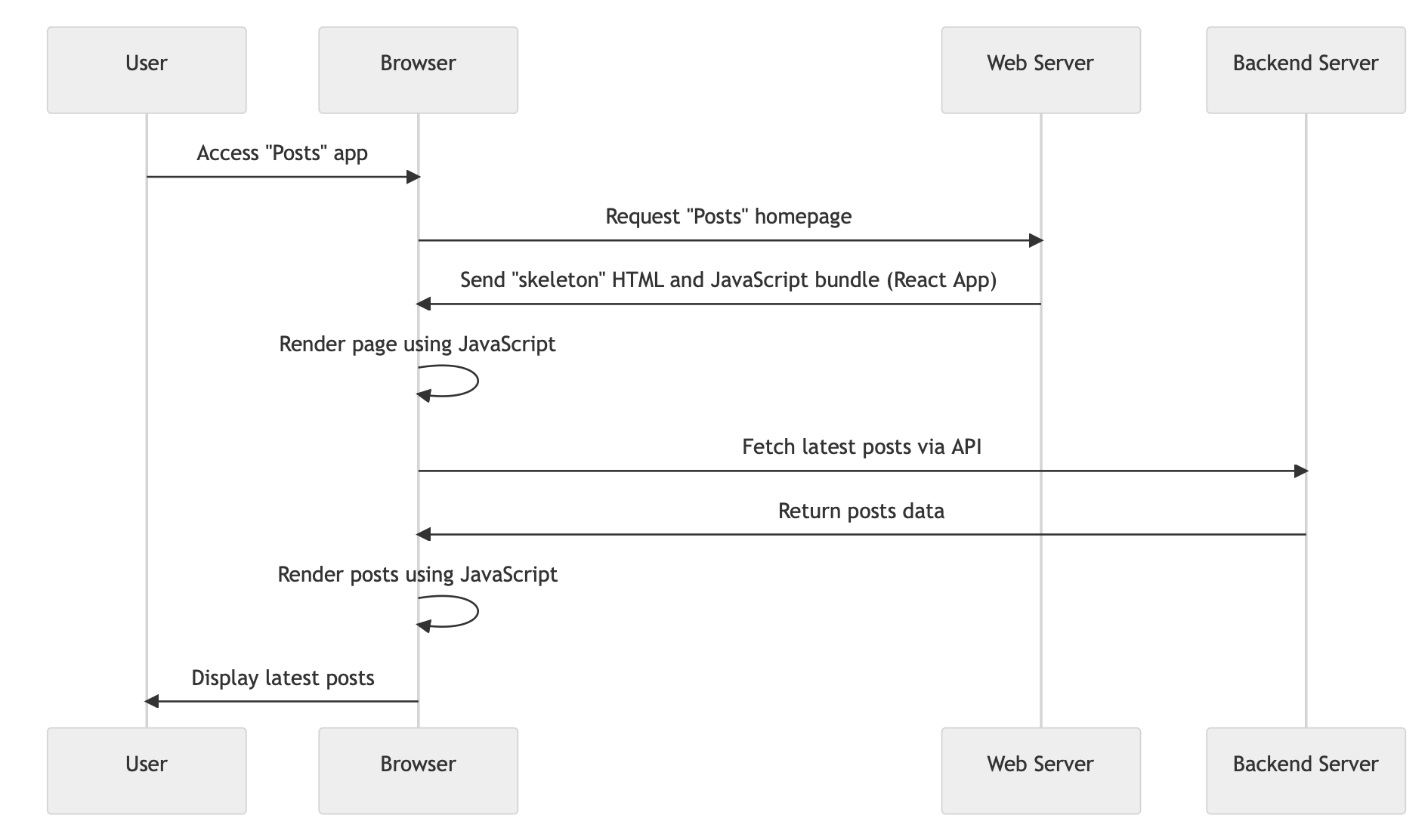
React was created with CSR in mind. Built in way where the developer can focus on state and react can be responsible for rendering based on the state. Good for building dashboards because it can update things really fast. It had good diffing and virtual DOMs.
Single Page Applications
SPA are web applications that load a single HTML page and dynamically update that page as the user interacts with the app.
- Everything happens in one HTML.
- It could tell the browser history to display certain URLs, but in reality you are still on the single page. It's simply an effect to seem that you are routing (this is the React Router). It simply renders a different page
- Uses Client Side Rendering (CSR)
- Can reduce the need for full page reloads, improving use experience.
- Reduces the need for full page reloads, improving user experience
- Design
SEO
Search engine optimization ensures websites rank well on search engines. With CSR, content is rendered dynamically using JS, which can pose challenges.
Search engine index primarily off HTML content, so when using dynamic CSR, context may not be indexed, thus reducing search engine visibility.
- Solution: use SSR or pre-rendering for the important pages.
SEO Examples with CSR: apps use CSR but other tools and techniques to optimize for SEO.
Server-Side Rendering
SSR is a technique where the server renders the web page content before sending it to the browser. Note: this is not the legacy static page.
- allows for immediate page view, improving perceived performance.
- enhances SEO as content is pre-rendered, aiding search engines.
- benefit: better initial load time compared to CSR alone.
- super snappy experience because everything is pre-rendered.
- challenge: increased server load and complexity in develop.
- imagine client size rendering Amazon, you need to wait for the catalogs to be fetched, it's going to take forever.
- SSR example with react: Next.js is one framework that facilitates SSR with React.
Flow: you go to a web page, then you send a request to view a certain item, the backend knows that someone has requested the item so it looks up the information retaining to that item/calls APIs/do something, then it generates everything that needs to be presented in that page as an html/css,
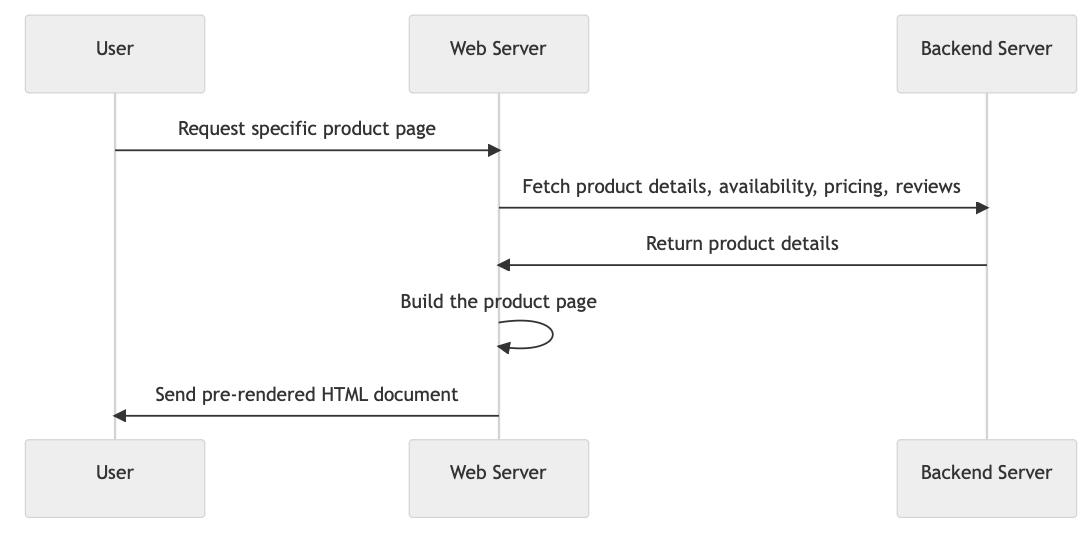
Comparison:
- dynamic pages work better with CSR.
- SEO is better for SSR in general because the web crawlers can navigate to different URLs and see what's in there. Otherwise, CSR will render a skeleton HTML that cannot be indexed.
E-commerce website are prime candidates for server-side rendering.
- dynamic content: up-to-date information on product availability, pricing, and user reviews.
- interactive elements: sections like "customers also bought" will change based on user behavior.
- SEO: crucial for product pages to drive sales and attract potential customers.
Comment page example:
- when you refresh the page, the javascript hits the endpoint, gets the data, and updates the single variable. The whole page doesn't have to be refreshed, for example, only the counter integer.
- how do you know when the content is updated. Hit endpoint periodically, caching with TTL, push notification model (real-time databases) where you can subscribe to said table so that information is pushed to the client.
- faster than server side rendering, because web server has to hit the API, get the latest changes, render the page, and then sends it back to you. The server has to re-render the entire page.
Multi page application
MPAs load a new HTML page from the server every time a user navigates or interacts with the application.
- uses SSR
- best used for traditional navigation and user flow.
- suitable for large-scale projects with diverse content.
- challenges: resource-intensive and slower navigation experience.
Examples: e-commerce site, online banking platforms
Static Site Generation
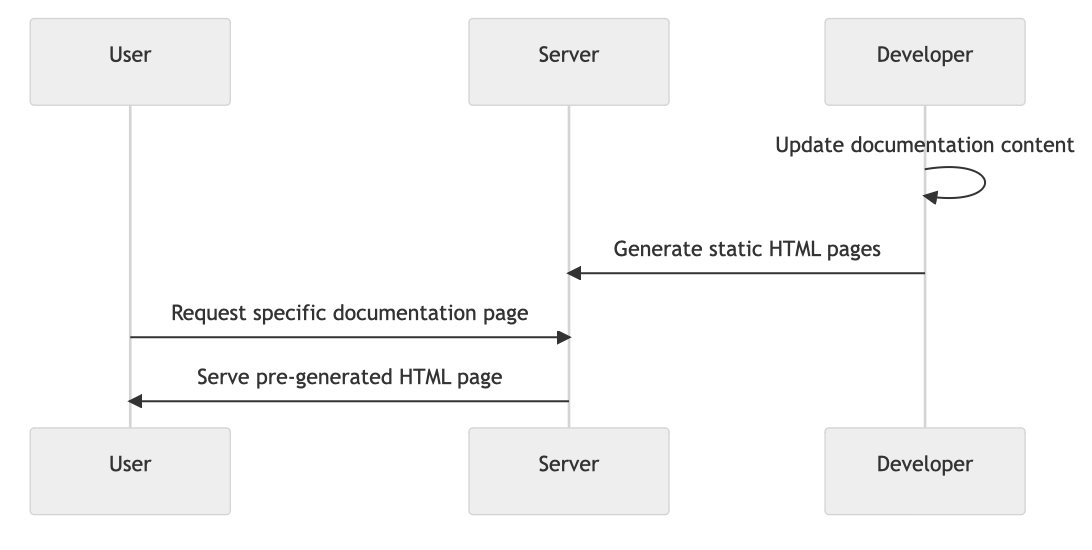
SSG is the method where web pages are generated at build time, not during run-time. Used in the early days of the internet.
- web pages are pre-built and ready to server.
- best suited for sites where content changes infrequently.
- potential benefit: faster load times, reduced server strain, and improved SEO.
- the server is dumb and doesn't build it
- challenge: not good for dynamic content. Rebuild is required for updates.
Content of pages, then have a static site generator. It then spits out the html files.
Examples: blogs, documentation websites, smaller e-commerce sites using platforms like Jekyll, Hugo, or Next.js (with SSG).
- documentations websites are great because they have stable content, will benefit from fast load time, SEO for tech products is important.
Hybrid Rendering Approaches
Incremental static regeneration (ISR) by Vercel:
- merges SSG speed with felxibility
- only certain pages are regenerated
Distributed Persistent Rendering (DPR) by Netlify:
- JAMstack benefits + dynamic updates
- pre-renders only critical pages, and creates others on demand
Edge Side Rendering (ESR):
- utilizes CDN's edge server for rendering
- combines benefits of SSR and SSG for faster delivery.
Service Worker
Service workers are background scripts that enable enhanced web app capabilities.
It runs separately from your web page and is fully asynchronous. They run in the background without needing a web page or user interaction.
Enables caching, background sync, push notifications, and custom responses to network requests.
Requires HTTPS due to their ability to intercept and modify network requests.
Software Architecture Patterns
First you gather require, then think about data and API layer. Now go even higher level, and think about software architecture as a whole. These patterns provide reusable solutions to common problems. The result of choosing correctly is a more efficient and scalable system.
Monolithic Architecture
Monolithic Architecture is a single codebase that handles all functionalities.
- All components are interconnected and interdependent; i.e., no separation between database, API, etc.
- You could have multiple replications of this service, but the app is served in one unit. Deploy the entire system.
Advantages:
- easy and faster to develop and test
- easy to deploy and scale initially
- all components are in one place for holistic optimization
- Good if you want to go to production fast.
Disadvantages:
- scalability issues as the system grows. When you scale one thing, you have to scale almost everything else.
- longer build and deployment times.
- Potential for tight coupling can lead to a complex codebase. When you change one thing, the lack of abstraction could cause issues.
Examples of Monolithic Architecture in practice:
- Most applications start off like this (early facebook, netflix, JIRA, legacy banking systems) but then evolves to microservice.
- Wordpress is a popular monolithic PHP application
Example: the "Posts" app as a monolith. Tech stack will be Blitz.js.
- frontend: integrated within Blitz.js (Next.js framework)
- backend: integrated within Blitz.js (tRPC as the API layer so it shouldn't be public facing + built-in auth)
- database: Prisma as ORM + SQLite file as a relational database
- deployment: deploy as a single unit on a platform like AWS EC2, digital ocean, anything that gets you a VM In the cloud..
A monorepo is one large code base that stores multiple projects. It facilitates code sharing and reduces duplication. Inside a monorepo, can be various types of projects including monoliths, microservices, and libraries. There is no relationship with monolithic.
Client-Server Architecture
A distributed approach dividing tasks between providers (servers) and requesters (client).
- clients request resources; servers provide them
- clients handle the user interface; servers manage data and logic
- single or multiple servers can provide services.
You could build different clients (web vs mobile, or driver vs rider app, restaurant vs consumer)
Advantages:
- clear separation of concerns enhances scalability
- distributed workloads boost performances and allows diverse tech stacks
- centralized server management aids in efficient resource utilization.
Challenges:
- requires coordination between client and server
- deployment complexity increases with multiple servers
- exposed server interfaces (APIs) elevate security concerns.
Example for our "posts" app.
- client (frontend): react-based web app is responsible for rendering UI and user interactions. Communicates with server via APIs for data and actions.
- server (backend): express.js with node.js. handles business logic, database interactions, and API endpoints. communicates with the database like PostgreSQL for data storage
- deployment: client deployed on platforms like AWS S3 (static) and the server hosted on EC2.
The browser client will request the web page from the web server, which acts as a service because it delivers the react app back to them. However, the web server may make request to the backend server to fetch the latest posts. Sometimes, the browser client may ask the backend server directly. Sometimes the backend server may build the html file that is sent directly to the browser client. There are different rendering strategies.
Layered (N-Tier) Architecture
Layered Architecture is a design pattern that divides an application into layers to separate concerns and responsibilities. The responsibilities can be things like Presentation, Business Logic, and Data.
- each layer only communicates with its adjacent layers
- benefits: modularity, maintainability, and scalability (individual components can be scaled independently). Clear separation of concerns reduces complexity.
- challenges: overhead of managing inter-layer communication, can introduce latency due to multiple layer interactions. Potential for over-complication if not designed well.
"Posts" example:
- Presentation layer includes the user interfaces, encompassing elements like post displays, user profiles, and interactions like liking and commenting
- Business logic processes user requests, like creating posts, adding likes, managing user profiles, and more.
- Data layer is where all the data is managed. Responsible for storing user profiles, posts, likes, comments, and other essential data. Ensures data integrity, consistency, and efficient retrieval.
Compare client-server vs layered architecture:
- Client-server architecture has high division between client (handles UI) and server (handles data and logic), and focuses on the distribution of tasks
- Layered architecture is the granular division into layers, especially within the server. Each layer has a specific responsibility and focuses on the separation of concerns.
Model-View-Controller
Model View Controller (MVC) is common for monolithic application and web applications. When you use ruby on rails you would deploy one application (spring boot with java is another example, Django with python, were all created for MVC).
- Model represents the data structure and business logic
- View displays the data to the user
- Controller is the intermediary; processes user input and updates the model and view layer.
We started with monolithic, and then it was broken into pieces.
Client-Server is two layers, but anymore would become a "layered oriented architecture."
"Posts" app example:
- presentation layer (view): build with react. Displays posts, likes, and user profiles
- business logic layer (controller): utilize express.js with node.js. Manages post creation, likes, and user interactions
- data layer (model): postgreSQL database. Stores user data, posts, likes, and comments.
- deployment: frontend deployed on netlift, backend hosted on heroku, database is managed with aws rds.
Pros: You don't want your presentation layer to hit your data layer, because its too tightly coupled. If you refactor your database, more pieces will be affected. A request should go from presentation to controller to data and back. You can also scale more independently
Cons: increases complexity. More scaffolding means more work. "Sinkhole layers" you have multiple layers and the intermediary layers are just handing it off, and not really doing work. You're following the architecture but your not contributing much.
- Implement 20/80 rule. It's okay if only 20% of the time its passing if off.
Service Oriented Architecture
Service-oriented architecture (SOA) externalizes these functionalities as distinct services. Each service would be reusable and they communicate through protocols like SOAP or REST.
For example an e-commerce platform using SOA would have the following services:
- inventory service: manage product stock and availability
- order service: handle order placement and payment
- customer service: manage customer profile and purchase history
Eventually, this concept evolved to microservices.
- increased granularity; break services into smaller, more focused units. E.g.,
UserManagementservices would be broken down intoUserRegistrationandUserAuthentication - Decentralization and independence: each microservice is self-contained within its own database and deployment strategy
- Communication: favor lightweight communication protocols like REST or gRPC.
Domain Driven Design
Focuses on core business domain and logic Model the software design based on real-world business scenarios. Identify the "bounded context which can be potential microservices."
For example in a Healthcare System:
- patient management context: handles patient records, histories, and appointments
- billing context: manage invoicing, insurance claims, and payments
- pharmacy context: drug inventory prescription, and dispensation.
Microservices
The microservices architecture:
- Focused service: Divide a service into the smallest pieces. In microservices, you might even divide user into user registration, user login, etc. Each microservice handles a specific business capability.
- Scalability: is its possible to independently scale each microservice based on demand
- Flexibility: use the best tech stack for each microservice's needs
- Resilience: if one microservice fails, it doesn't bring down the entire system.
A microservice should be almost completely independent. After modularizing things, you make each one its own thing.
Challenges of microservices:
- complexity: inter-service communication can be intricate as more components are built
- data consistency: with services having their independent database, ensuring data consistency can be challenging
- deployment: requires sophisticated deployment and monitoring tools
- service coordination: requires strategies for service discovery, load balancing, and fault tolerance.
"Posts" app example microservice.
- services:
- user service: manage user profile
- post services: handle creation, retrieval, and deletion of posts
- comments service: manages comments on posts (create, retrieval, deletion)
- notification service: sends notifications to user based on activity
- deployment:
- containerization: each service is containerized using Docker for environment consistency.
- orchestration: Kubernetes handles the deployment, scaling, and management of service containers.
- communication: services created via HTTP/REST or asynchronous messaging for events.
- database: each service has its own database for true data independence.
Containers
Containers are lightweight, stand-alone, and executable software packages that encapsulate a piece of software in a complete file system.
- Contains everything needed to run: including code, runtime, system tools, libraries, and settings
- Consistent and reproducible environment across different stages.
- Eliminates the "it only works on my machine" problem
Containers are needed because of deployment challenges with consistency, scalability, and isolation:
- different environments led to deployment issues
- scaling applications required duplicating the entire VM or server
- isolating applications meant that running multiple VMs which consumed more resources.
Bare metal is the physical servers; direct access to hardware Virtual machines (VMs): emulate physical hardware, and can run multiple OS instances Containers: share OS kernel, are isolated process; are lightweight compared to VMs.
Docker is a platform that automates container creation, deployment, and management:
- provides consistent environment for applicatons
- uses a Dockerfile to define container specifications
- Docker Hub is a repository for sharing container images.
- Containers is the technology that encapsulates software in a consistent environment and docker is the tool/platform to create, deploy, and manage containers. Docker streamlined and popularized the use of containers, but its simply a tool that uses the methodology of containers
- alternative containerization technologies: podman (daemonless and rootless) and rkt (rocket) (emphasizes security and simplicity)
History of how docker and container came to be.
- companies aim for things that are more powerful than they actually need, just in case. Overestimating results in lots of resources. This quite wasteful.
- the concept of VMs came along. On one hardware, there are many VM running. "bare metal" is the physical hardware. One bare metal to say 10 VM can still be too much because you need so many OS.
- Then, the idea of containers came along. One bare metal uses one OS, but many containers running individual processes. They are all super lightweight. Easy to spin up and tear down. This is not a new concept. Old operating systems like Unix and Linux lets you have an individual sandbox for each process, but it was super complex to pull off orchestration in here.
- Then docker came along. Container = methodology, docker = tool to make, manage containers. Docker reads a file with specification and then you can start using that provisioned system. This tooling made containers available to everyone. One of the best ways to program, is you make a container to develop your application that way everyone is in the same environment. A container is self contained! You can even deploy this.
Containers are not limited to microservices. They can also be used for monoliths, traditional apps, batch jobs, and more.
On the other hand, you can implement microservices without dockers. Some organizations use VMs, serverless functions, or traditional servers.
Kubernetes
Kubernetes(K8s) is an open-source container orchestration platform. It's like an operating system for your cluster. You
- manages the deployment, scaling, and operations of containerized applications across a cluster of machines
- ensures high availability, load balancing, and auto-scaling
- works with various container tools, not just docker.
- necessary because this process is
- complex: managing multiple containers manually is challenging
- scalability: automatic scaling based on demand
- resilience: ensure high availability and fault tolerance.
Ways to manage docker images?
- you can start by managing it yourself by making programs.
- Kubernetes, the software solution made by Google to manage Docker. (a OS for managing docker). Kubernetes allows you to make configurations and settings and it takes care of everything.
- cloud providers typically have Kubernetes services.
- if dockers were containers on a ship, then Kubernetes (is a ship) because it moves containers. containers could contain anything.
"Posts" app example each of the services (user, post, comment, notification services) will be packaged into a container. Instead of deploying these containers individually and managing them manually, use Kubernetes.
- Here are the key Kubernetes components:
- Nodes are physical machines or VMs where the services will run as containers
- Pods are the smallest deployable unit that can contain 1+ containers. For "posts", we might have separate pods for each service.
- Deployments and ReplicaSets: we don't directly create pods. Instead, define a Deployment that specifies the container image to use and the desired number of replicas. K8s will ensure that the desired number of replicas (pods) are maintained. If a pod crashes, then K8s will replace it to maintain the desired count.
- Services: pods will have their own internal IP address, which can change upon restarts. A Service is an abstraction that defines a logical set of pods and a policy to access them (like a load balancer). For example, the front-end of the "Posts" app might access the Posts Service through its service name.
- ConfigMaps/Secrets: stores configurations such as database URLs for "posts" without embedding int he app.
- Ingress is an object that allows external access to services in the cluster, typically HTTP. Using Ingress, you can define routing rules, SSL/TLS configurations.
- Process:
- Write a K8s configuration (in YAML) for each service of "posts". These define the desired state for each component (Deployments, Services, etc.)
- Use
kubectlcommand line tool to apply these configurations and instructs K8s to set up the specified resources. - In K8s would then schedule the pods to run on nodes in the cluster, ensuring the desired number of replicas for each service maintained.
- If traffic to "posts" increases, you can scale up by increasing the number of replicas. K8s would then launch additional pods to increase the demand.
- If a mode fails or becomes unreachable, then K8s automatically reschedules the pods from the failed node to other nodes in the cluster, which ensures high availability.
- Through Ingress, you would define how external traffic should be routed to the services inside the cluster, so that users can access "posts"
K8s alternatives:
- Docker swarm, the native clustering for Docker
- Apache Mesos, a scalable cluster manager
Serverless Architecture
Serverless is about abstracting away server management and infrastructure aspects, so that developers can just focus on code. They enable a bunch of cool services:
- automatic scaling: functions scale based on the number of incoming requests
- event-driven: functions are executed in response to specific events or triggers
- no infrastructure management: no need to provision, maintain, or administer servers.
- Pay as you go pricing means that you pay only for actual compute time that your function consumes
Benefits include:
- developer productivity: focus on code, not infrastructure
- cost efficiency: pay-as-you-go means no underutilized server or over-provisioning
- scalability: automatically scales based on demands
- reduced operational overhead: no servers to patch, update, or maintain
Challenges:
- cold starts: initial delay when a function is invoked for the first time after being idle
- state management: functions are stateless
- long-running processes: not suitable for long execution times
- vendor lock-in: potential for being tied to a particular cloud provider's implementation and service
AWS Lambda: event-driven, serverless compute platform. You can run backend code in response to changes to data in S3, DynamoDB or custom events generated by applications or devices. Some key features are
- automatic scaling
- integration with other AWS services
- supports multiple languages
Examples of serverless applications:
- image processing
- data pipeline
- chatbots
- IoT backend
- scheduled tasks
Scaling with serverless:
- adaptive: functions scale based on number of incoming requests
- concurrent executions: multiple instances of a function can run concurrently to handle multiple events.
- bursts and prolonged traffic: designed to handle sudden traffic spikes and consistent high traffic
Lambda shutdown provides a clean state and seamless user experience.
- statelessness: means that each invocation of the lambda doesn't remember past events or data. All it knows is the current image it needs to process.
- end result: a seamless user experience, once a function has been processed the image and saved, it can instantly be displayed, providing a smooth and quick user experience.
Other patterns:
- edge computing: run code closer to the data souorce
- event-driven architecture: systems that react to external/internal events
- hybrid approach: combine different architectural patterns for optimized solutions.
Linked from Software System Design