Case Study: URL Shortener
URL Shortener
System design steps during technical interviews
clarify requirements: understand functional, non-functional requirements, and constraints
- If you have 45 minutes, spend 5-10 minutes.
- Even if you are given good instructions, re-state and clarify.
top-down design: use a structured approach, like the C4 model, starting with the system's broad context.
Iterative refinement: start with a basic design, adding complexities iteratively to meet evolving requirements
Focus on components: dive deep into each component or container, addressing its specific challenges and requirements
Verbalize and visualize: explain decisions aloud and use diagrams to convey designs effectively.
Clarifying Requirements
URL Shortener functional requirements
Functional must haves:
- url shortening: input a long URL to obtain a shorter version
- url redirection: accessing a shortened URL redirects them to the original URL.
Functional should haves:
- web app UIL: shorten and manage URLs through a web interface
- public API: integration capabilities for developers and external services
Functional Could have:
- user accounts: optional accounts for tracking and managing URLs
- custom short URLs: registered users can customize the end of their shortened URLs.
Functional won't haves:
- url analytics: tracking metrics and statistics for URL usage
- url expiration: set a specific expiry date for shortened URL.
Non-functional requirements (quality):
- performance: redirection takes < 50ms on average
- scalability: up to 1M URL shortening requests per day and store 1B shortened URLs
- high availability: 99.95% uptime
- reliability: detect and block 95% of malicious URLs and have false positive of <0.1%.
Non-functional requirements (system constraints)
- Technical constraints:
- existing system integration: service should be compatible with multiple internal and external system, which communicate over HTTP/HTTPS
- consistent data state: ensure consistent and stateless interactions to provide a uniform experience across various platforms.
- Legal constraints: none
- Business constraints: none
C4 Model
The C4 model is a framework for visualizing software architecture across multiple level of abstraction. Think of the software system as a hierarchy of building blocks. Helps in structuring system design and communication with software architecture. Facilitate understanding from a high-level system overview to detailed code-level insights. It stands for context, containers, components, and code:
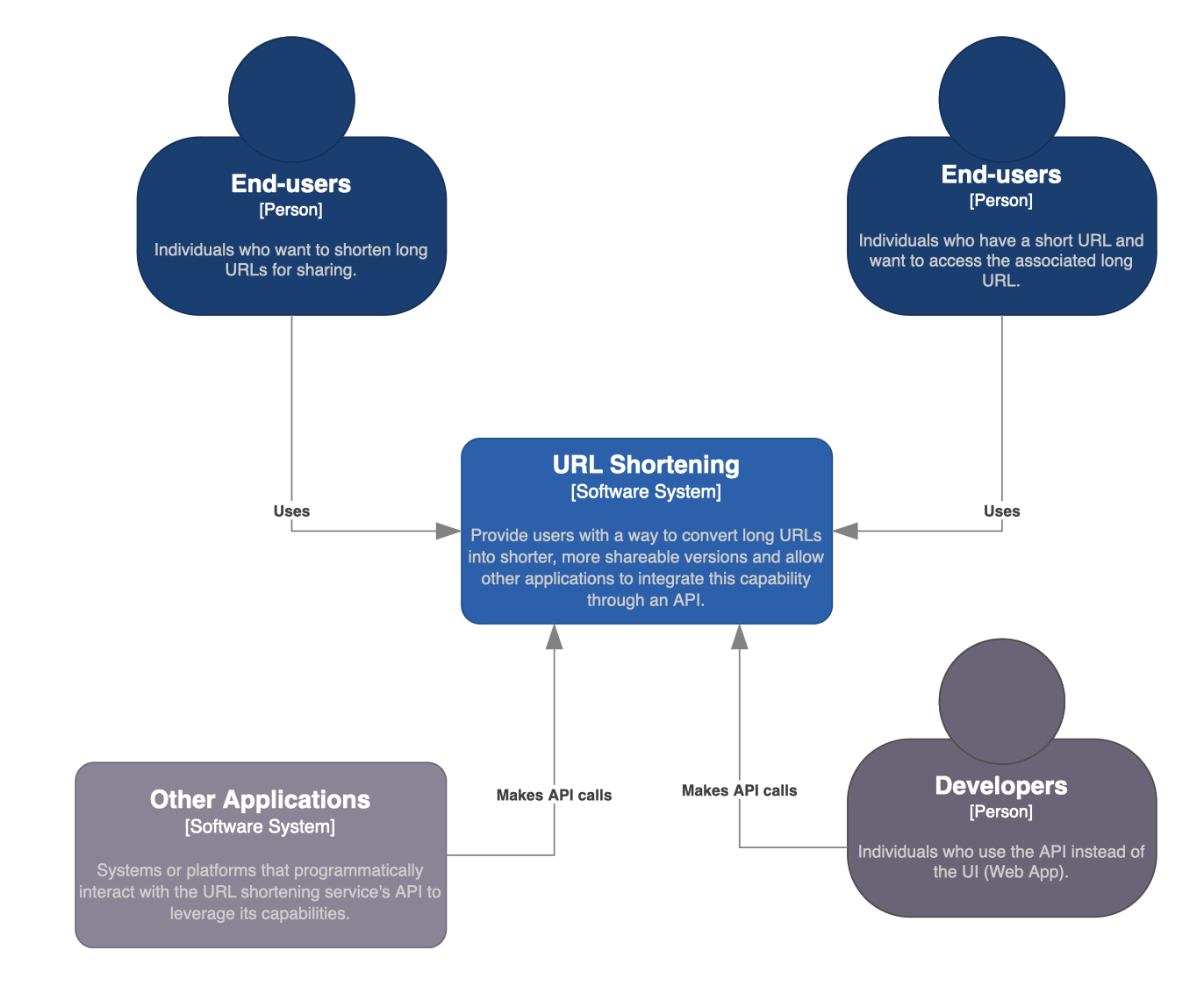
- Context: look at the system as a black box. Who are the entities interacting with it? There might be external systems you are working with.
- Container: all the services you have should be independent, deployable units. These are services that make up the bigger system.
- Component: you can open up each of these containers, and look at the components that make up that container. For example, an API might be a container, but inside that there are different endpoints. Each of these endpoints would be a component of that API system
- Code: this is the level after you open up an component. This is where you can talk about the classes via UML and what algorithm you are using
You can have more or less levels of abstraction.
Context Level
Notation:
- The system is represented a box labeled with the system's name
- Users are defined as person icons
- External systems are represents as smaller boxes labeled with the system name.
- Interactions are shown as arrows connecting users and external systems. Direction of the arrow indicates the direction of interaction.
Container Level
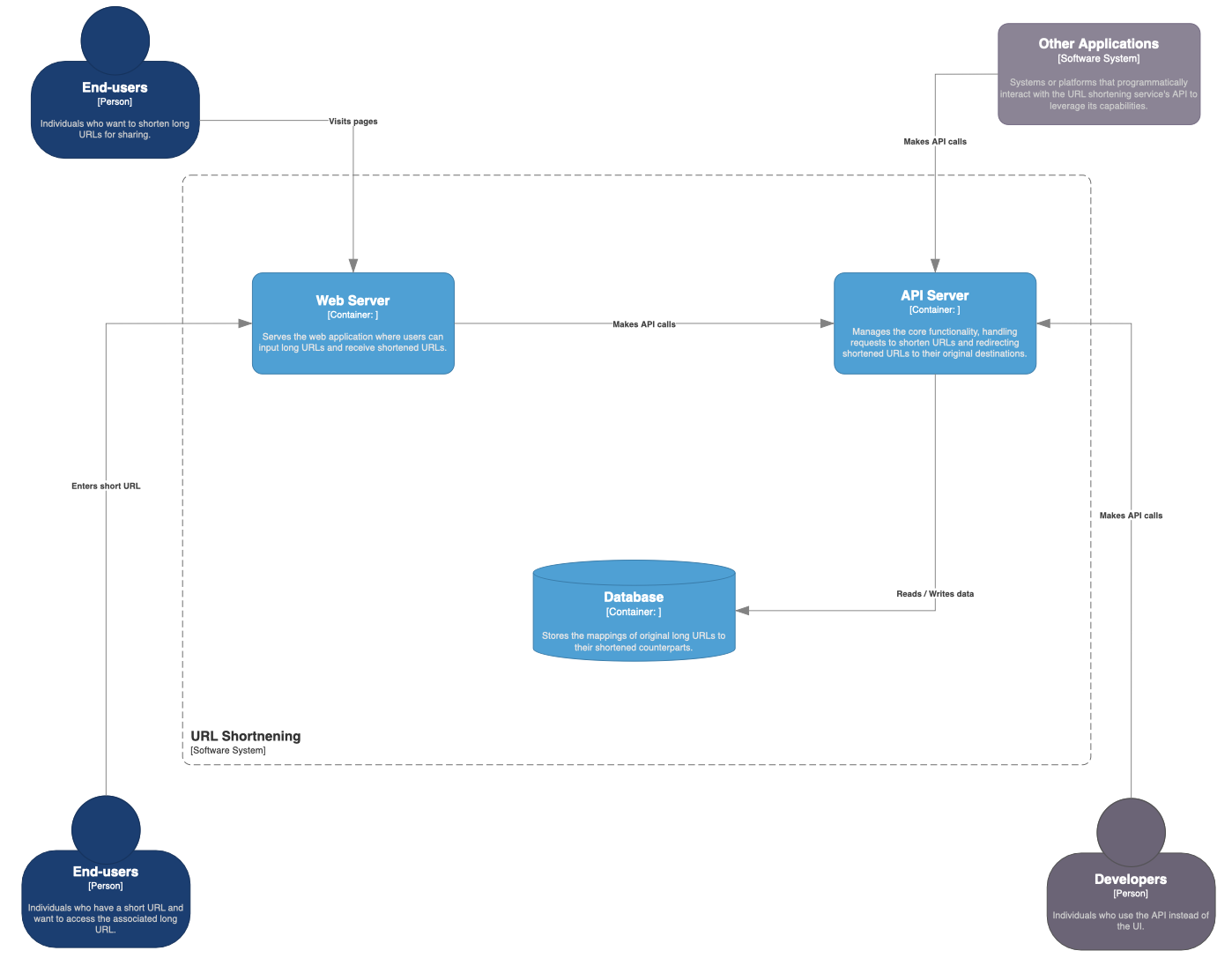
The container level dives deeper than "context", focusing on the system's high-level architecture.
- breaks down system into containers, which can be applications, data stores, or specific services.
- describes how containers interact with each other and with external systems
- provides insights into the system's deployment, technology choices, and communication patterns
In other words, its a context or boundary which some code is executed or some data is stored. Each container is a separately deployable/runnable thing or runtime environment, and is typically running in its own process space.
Notation:
- The system is a large rectangle box labeled with the system's name.
- Represent each container (web app, database, background service) as a smaller rectangle inside the larger system's rectangle. Label each container with its name and type.
- Interactions are represented using arrows to show how the containers communicate with each other. Additionally, label the arrows with the protocol or method of communication (HTTP, SQL query)
- External systems have similar notation as the context level. They should still be outside the main system's box
- Data flow can be represented with arrows to show what data is being exchanged.
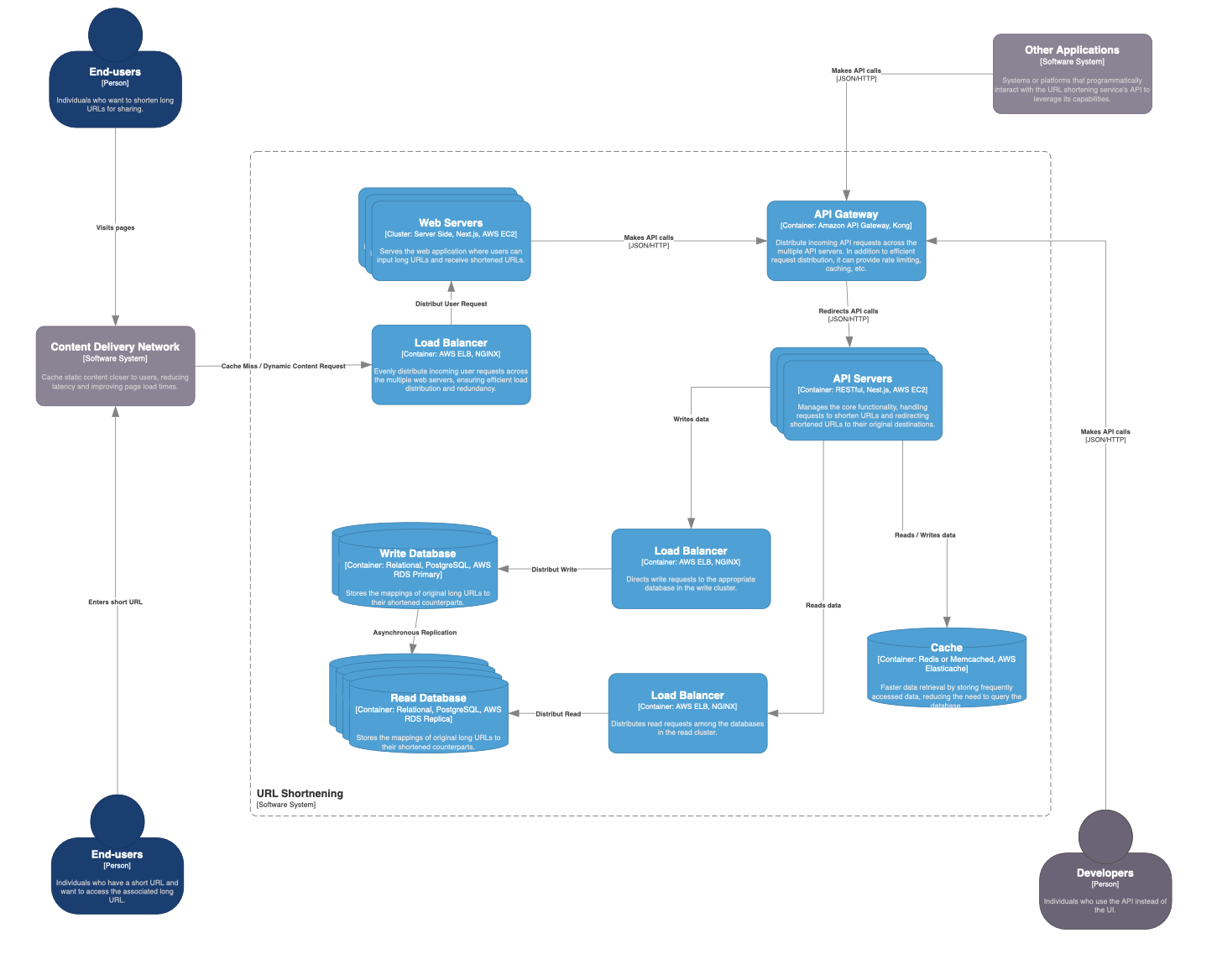
 Iteratively refine each container:
- API server: choose the right technologies, deploy multiple servers (replication), add API gateway and load balancer to balance API requests
- Database: choose the right technologies, replicate database, separate read and write clusters because of the read/write imbalance, add load balancer to efficiently distribute database queries.
- API: introduce caching to reduce load on read replicas, choose the right caching system, place the cache in the right place.
Component Level
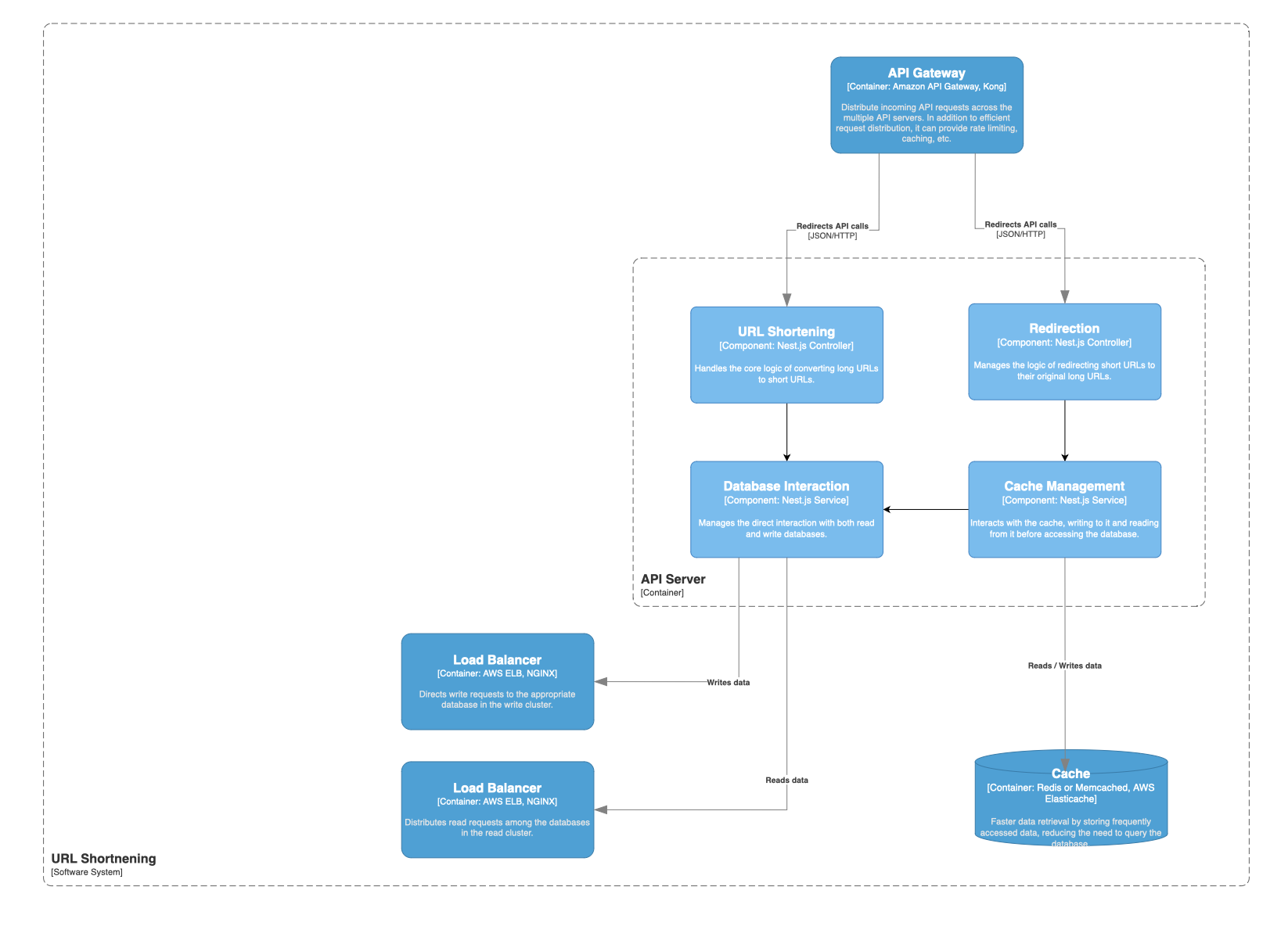
The component level zooms into containers in details the individual components and their interactions. Represents higher granularity. Focuses on the major interactions between components within a specific container.
Notation:
- components = rectangles
- interactions are labeled arrows
- external systems are denoted with dashed boundaries
- data stores are represented as cylinders.
Code Level
Can even go down to the algorithm level. Its the most detailed view of the C4 model. Focuses on the internals of a single container. Describes how different parts of the container work together. Use UML or ERD diagrams.
In the context of our URL shortener example, we could add details about its API Request
- API endpoint:
POST /shorten - Request
- Content type: `application/json
- Body:
{ "longUrl": "https://example.com/very/long/url/path" }
- Response:
- Status Code:
201 Created(successful),400 Bad Request(malformed request),500 Internal Server Error(server error). - Content Type:
application/json - Body (success):
{ "shortUrl": https://short.url/abc123" } - Body (error):
{ "error": "Description of the error" }
- Status Code:
Or, you could explain the shortening algorithm.
Linked from Software System Design