SQL
SQL Query Language
Data Definition Language (DDL) defines database structure and access controls
- create
- drop
- alter
Data Manipulation Language (DML) is for retrieving and updating data
- update
- insert
- delete
- retrieve
Data Definition Language
Create
CREATE TABLE creates a table. Specifies a new relation. Needs name, attributes, and its initial constraints
CREATE TABLE table_name (
	column1_name datatype,
	column2_name datatype,
	...
	columnN_name datatype,
	PRIMARY KEY (one or more columns)
);
Example:
CREATE TABLE PROJECT(
	PNAME VARCHAR(15) NOT NULL,
	PNUMBER NUMBER,
	PLOCATION VARCHAR(15),
	DNUM NUMBER NOT NULL,
	CONSTRAINT PK_PROJECT PRIMARY KEY (PNUMBER),
	CONSTRAINT FK_PROJECT_DNUM FOREIGN KEY (DNUM) REFERENCES DEPARTMENT(DNUMBER)
);- The key, entity integrity, or referential integrity constraints can be specified on creation or you can add them later using
ALTER TABLE.
Attribute Data Types
| SQL Standard | Oracle | Definition |
|---|---|---|
CHARACTER(n) or CHAR(n) | CHAR(n) | Fixed-length character string |
CHARACTER VARYING(n) or VARCHAR(n) | VARCHAR2(n) | Variable-length character string |
NATIONAL CHARACTER(n), NATIONAL CHAR(n), or NCHAR(n) | NCHAR(n) | Fixed-length character string in the national character set |
NATIONAL CHARACTER VARYING(n), NATIONAL CHAR VARYING(n), NCHAR VARYING(n) | NVARCHAR(n) | Variable fixed-length character string in the national character set |
SMALLINT | Small integer (2 bytes) | |
INTEGER or INT | Integers (2 bytes) | |
NUMBER(n) | Decimal precision using integer | |
FLOAT, DOUBLE, DOUBLE PRECISION, REAL | NUMBER | Floating point number |
NUMERIC(m,d) or DECIMAL(m,d) | `NUMBER(m,d) | Fixed point number |
DATE | DATE | Date |
TIMESTAMP | TIMESTAMP | Date and time |
INTERVAL YEAR TO MONTH or INTERVAL DAY TO SECOND | INTERVAL YEAR TO MONTH or INTERVAL DAY TO SECOND | Intervals |
BOOLEAN or BOOL | BIT, BIT VARYING, or VARBIT(n) | Binaries |
CHARACTER LARGE OBJECT or CLOB | LONG (deprecated) or CLOB | Character large object |
BINARY LARGE OBJECT or BLOB | RAW (deprecated), LONG RAW (deprecated), BLOB, BFILE | Binary large object |
Declaring a domain specifies a data type, which can be used for attribute specification. This makes it easy to change the data type for a domain that is used for multiple attributes.
CREATE DOMAIN SSN_TYPE AS CHAR(9);Attribute Constraints
NOT NULL
CREATE TABLE DEPARTMENT(
	DNAME VARCHAR(15) NOT NULL
);
The NOT NULL attribute constraint is used to specify that NULL is not permitted.
- If an attribute is the primary key, this is always implicitly specified.
DEFAULT
Dno NUMBER NOT NULL DEFAULT 1DEFAULT <value> in an attribute definition defines a default value. This default value is used in any tuple where an explicit value is not provided.
CHECK
Dnumber NUMBER NOT NULL CHECK (Dnumber > 0 AND Dnumber < 21)- This restricts attribute or domain values.
You can also use it in conjunction with the CREATE DOMAIN statement
CREATE DOMAIN D_NUM AS INTEGER CHECK (D_NUM>0 AN D_NUM<21);Key and Referential Integrity Constraints
Used within CREATE TABLE.
PRIMARY KEY clause specifies one or more attributes that make up the primary key of the relation (table).
... CONSTRAINT PK_PROJECT PRIMARY KEY (Pnum)UNIQUE clause specifies alternate (unique) keys or candidate keys. It can also be specified directly for a unique key if it is a single attribute.
Dname VARCHAR(15) UNIQUEReferential integrity can be specified using FOREIGN KEY clause.
- Referential integrity constraints can be violated with tuples are inserted/deleted or a FK or PK is updated. By default, when SQL experiences an integrity violation, it will reject with
RESTRICToption, orSET NULL, orCASCADE, andSET DEFAULT. - An option must be qualified with either
ON DELETEorON UPDATE
CONSTRAINT FK_EMPLOYEE_SUPERSSN FOREIGN KEY (SUPERSSN) REFERENCES EMPLOYEE(SSN)Table constraints can also be CHECK clauses. Add at the end of the CREATE TABLE statement. They are called row-based constraints because they apply to each row individually and checked when a row is inserted/modified.
CONSTRAINT CH_SEX CHECK (SEX IN ('F', 'M'))- where
CH_SEXis the name of the check andSEXis an attribute of this table.
Schema
SQL Schema groups tables, types, constraints, views, domain, and other constructs that belong to the same database application. Defined with a name and an authorization identifier to indicate the user/account owner.
CREATE SCHEMA COMPANY AUTHORIZATION 'Jsmith';- There is always a default schema.
Catalog
A catalog is a named collection of schemas.
A catalog always contains a special schema called INFORMATION_SCHEMA which provides information on all the schemas in the catalog and all the element descriptors in these schemas.
Drop
The DROP command can be used to drop named schema elements, such as SCHEMA , tables, domains, types, or
constraints. There are two drop behavior options:
CASCADEdeletes all related rows in the child tablesRESTRICTwill abort the delete operation if there are any related rows in the child tables
DROP TABLE EMPLOYEE CASCADE CONSTRAINTS;
DROP TABLE DEPARTMENT CASCADE CONSTRAINTS;
Alter
ALTER delete, add, or modify the columns of or add constraints to an existing table or other named schema elements.
ALTER TABLE COMPANY.EMPLOYEE ADD COLUMN Job VARCHAR(12);
ALTER TABLE COMPANY.EMPLOYEE DROP COLUMN Address CASCADE;
ALTER TABLE COMPANY.DEPARTMENT ALTER COLUMN Mgr_ssn SET DEFAULT ‘333445555’;
ALTER TABLE COMPANY.EMPLOYEE DROP CONSTRAINT EMPSUPERFK CASCADE;
ALTER TABLE WORKS_ON ADD CONSTRAINT FK_WORKS_ON_PNO FOREIGN KEY (PNO) REFERENCES PROJECT(PNUMBER) ON DELETE CASCADE;
ALTER TABLE WORKS_ON ADD CONSTRAINT FK_WORKS_ON_ESSN FOREIGN KEY (ESSN) REFERENCES EMPLOYEE(SSN) ON DELETE CASCADE;
Data Manipulation Language
Insert
INSERT adds a single tuple (row) to a relation (table).
- Include relation name, list of values in the same order in which the attributes are specified in the
CREATE TABLEcommand
INSERT INTO EMPLOYEE VALUES ( ‘Richard’, ‘K’, ‘Marini’, ‘653298653’, ‘1962-12-30’, ’98 Oak Forest, Katy, TX’, ‘M’, 37000, ‘653298653’, 4 );Alternatively, you can specify the attribute names that correspond to the provided values. This way, you can leave out attributes that allow NULL or have DEFAULT values set.
INSERT INTO EMPLOYEE (Fname, Lname, Dno, Ssn) VALUES (‘Richard’, ‘Marini’, 4, ‘653298653’);A DBMS should support and enforce all integrity constraints that can be specified in the DDL by rejecting commands.
Delete
Removes tuples from a relation. It includes a WHERE clause to select the tuples to be deleted
- Tuples are deleted from one table at a time, however the deletion may propagate to other relations if referential triggered actions are specified in the referential integrity constraints of the DDL.
Update
Modifies attribute values of one or more selected tuples. Updating a PK value m ay propagate to FK values in other relations if a referential triggered action is specified in the referential integrity constraints of the DDL.
Additional SET clause specifies the attributes to be modified and their new values.
UPDATE PROJECT
SET Plocation = ‘Bellaire’, Dnum = 5
WHERE Pnumber = 10;
Retrieving (Simple Queries)
SELECT retrieves information.
FROMclause gives the relation(s) to which the query refersWHEREclause is a condition which tuples must satisfy in order to match the query. If the condition evaluates to true, then the components inSELECTare produced as one tuple of that answer.SELECTclause tells which attributes of the tuples matching the condition are produced as part of the answer.*can be used to produce the entire tuple.
Simple queries retrieves data from a single relation Complex queries retrieves data from several tables.
Examples
SELECT *
FROM MOVIE
WHERE studioName = 'Disney' AND year = 1990;- finds information about movies from Disney in the year 1990.
PROJECTION selects some columns.
SELECT Ssn, Bdate FROM EMPLOYEE  -- selects these columns
SELECT * FROM EMPLOYEE -- selects all data
Use alias to rename attributes on the output
SELECT Bdate AS Date_of_birth FROM EMPLOYEEArithmetic operators can be used like +, -, *, /.
SELECT Fname, E.Slaary * 1.1 As Increased_sal FORM EMPLOYEETo prevent duplicate values, you can use SELECT DISTINCT to eliminate the duplicate values. SELECT ALL won't (this is default option when you just use SELECT)
SELECT ALL Salary FROM EMPLOYEES;
SELECT DISTINCT Salary FROM EMPLOYEES;
To order the output, use ORDER BY <list_of_attributes>
- the order is going to be default ascending (omit), but adding
ASCorDESCexplicitly orders it.
SELECT Dname, Mgr_ssn FROM DEPARTMENT ORDER BY Dname DESCSelection choses the tuple we want to output. This is by using the WHERE clause. When omitted, then all tuples of that relation are going to be selected. There are 6 common operators to compare constants and attributes.
- String-valued constants are denoted by surrounding them with single quotes.
- Numeric constants like integers and real numbers are allowed
- The result of a comparison is always a Boolean value
TRUE/FALSe - Boolean operators can be combined with logical operators:
AND,OR, andNOT.NOTcomes beforeANDandORand can be overriden with parenthesis.
SELECT Bdate, Address
FROM EMPLOYEE
WHERE Fname = ‘John’ AND Minit = ‘B’ AND Lname =
‘Smith’;
Comparison of strings
- Two strings are equal if they are the same sequence of character.
- Using lesser than or greater than operators check for alphabetical order
- SQL allows you to compare strings on simple pattern match using
LIKE - Partial strings are specified with two reserved characters:
%replaces an arbitrary number of zero or more character (wildcard)_replaces a single character
- Apostrophes cannot be represented as itself, so use the
´´to represent one
Example
SELECT Fname, Lname
FROM EMPLOYEE
WHERE Address LIKE ‘%Houston, TX%’;- will find an address containing "Houston, TX"
Dates and time can be represented in the following ways:
DATE '1948-05-14'using the keyword with a quoted string- In oracle you can use
to_date('05/22/1944', 'mm/dd/yyyy)
The expression IN() checks if an expression is in a list of values.
SELECT Fname, Lname
FROM EMPLOYEE
WHERE Dlocation IN ('Houston', 'Stafford')
To check null expressions, use IS NULL because =NULL will not work.
Between is expressed with BETWEEN <min> AND <max>
SELECT Fname, Lname
FROM EMPLOYEE
WHERE (Salary BETWEEN 30000 AND 40000)
Aggregation operators can aggregate values in a column. It can also be used to group tuples of a relation according to some criterion and then aggregate them within each group.
SUM, the sum of the values in this columnAVG, the average of values in this columnMIN, the least value in the columnMAX, the greatest value in the columnCOUNT(column), the number of values (including duplicates unless if they are eliminated with DISTINCT)COUNT (*), the number of tuples
-- average salary of all employees
SELECT AVG(Salary) “Average salary of all employees”
FROM EMPLOYEE

-- output
> “Average salary of all employees” 31953,66971


-- Find the number of employees of the company
SELECT COUNT(*) “Number of employees”
FROM EMPLOYEE

-- output
> "Number of employees" 6
Grouping is defaulted to the overall relation. To divide a table into groups use GROUP BY to specify the columns by which you want to group following the WHERE clause. The grouping attributes must appear in the SELECT clause.
SELECT Dno, COUNT (*) AS Employees, AVG (Salary)
FROM EMPLOYEE
GROUP BY Dno;
Having is used to choose the group based on some aggregated property of the group itself. Think about it like filtering the groups on some criteria of that group.
For example, if you wanted to find the number of employees and average salary per department only for those departments with more than 33000 average salary.
SELECT Dno, COUNT (*) AS Employees, AVG(Salary)
FROM EMPLOYEE
GROUP BY Dno
HAVING AVG(Salary) >= 33000
In summary, the formula is as follows:
SELECT <attribute and function list>
FROM <table list>
[ WHERE <condition> ]
[ GROUP BY <grouping attribute(s)> ]
[ HAVING <group condition> ]
[ ORDER BY <attribute list> ];
Retrieving (Complex Queries)
Nested queries is a SELECT (subquery) inside a SELECT (query). The result of the subquery is used in a condition in the WHERE clause. Two possibilities:
- When the subquery returns a single value then
WHEREclause of query uses=operator and the subquery only retrieves a ==single row==.-- last & first name of employees that work in the same department of the employee with SSN 123456789. SELECT Fnane, Lname FROM EMPLOYEE WHERE Dno = (SELECT Dno FROM EMPLOYEE WHERE Ssn=‘123456789’) - When the subquery returns several values then
WHEREclause usesINoperator that allows in the condition to ==compare to a list of values==.SELECT DISTINCT Pnumber FROM PROJECT WHERE Pnumber IN ( SELECT Pnumber FROM PROJECT, DEPARTMENT, EMPLOYEE WHERE Dnum = Dnumber AND Mgrssn = Ssn AND Lname = ‘Smith’ )
In simple queries, you can only select data from ==one== table. If we need data from ==several== tables, we need to combine them.
JOINoperation combines rows from two or more tables- Set-theoretic operations include
UNION,INTERSECTION,DIFFERENCE
When you want to couple relations in one query:
- list each table in the
FROMclause - then the
SELECTorWEHREclause can refer to the attributes from any of the relations mentioned in theFROMclause.
JOIN of two tables takes two relations and returns as a result of another relation. This condition compares two columns, each from a different table. To execute, the DBMS will combine pairs of rows, each containing one row from each table for which the join condition evaluates to TRUE. The columns in the join condition need not to appear in the SELECT list.
- Use the FK in the join combination.
- Attributes can be disambiguated using
Table_name.Attribute_name - These additional operations are typically used as subquery expressions in the
FROMclause.
Join condition defines which tuples in the two relation matches, and what attributes are present in the result of the join
natural,on <predicate>,using(A1, A2, ..., An)
Join type defines how tuples in each relation that do not match any tuple in the other relation (based on the join condition) are treated.
- INNER JOIN: INNER JOIN returns all rows that match the ON condition. Tuples without a match are not included in the output (also called JOIN).
- NATURAL JOIN: If the tables have columns with the same name, you can use NATURAL JOIN instead of JOIN.
- LEFT OUTER JOIN: LEFT OUTER JOIN returns all rows from the left table with matching rows from the right table. Rows without a match are filled with NULLs. (also called LEFT JOIN)
- RIGHT OUTER JOIN: RIGHT OUTER JOIN returns all rows from the right table with matching rows from the left table. Rows without a match are filled with NULLs. (also called RIGHT JOIN).
- FULL OUTER JOIN: FULL OUTER JOIN returns all rows from the left table and all rows from the right table. It fills the non-matching rows with NULLs. (also called FULL JOIN)
Set-theoretic operators combine the result of two or more queries into a single result.
UNIONcombines the result of two sets and removes duplicatesINTERSECTreturns only rows that appear in both result setsEXCEPTreturns only the rows that appear in the first result set but do not appear in the second result set.
SELECT name
FROM student WHERE campus=‘Leganes’
UNION
SELECT name
FROM professor WHERE campus = ‘Leganes’;


SELECT name
FROM student WHERE campus=‘Leganes’
INTERSECT
SELECT name
FROM professor WHERE campus = ‘Leganes’;

SELECT name
FROM student WHERE campus=‘Leganes’
EXCEPT
SELECT name
FROM professor WHERE campus = ‘Leganes’;
Trigger
Triggers are blocks of Procedural Language SQL code that are associated with a table and are executed automatically in reaction to a specific DML operation (like INSERT) on that table.
Implementation of a semantic constraint like SERIES.Num_seasons means that when a row is inserted into the SEASON table, then SERIES.Num_seasons is incremented by one.
To create a table:
CREATE [OR REPLACE] TRIGGER <name_trigger>
{BEFORE | AFTER} event ON referenced table
[FOR EACH ROW [WHEN event_condition]]
body_trigger;- Trigger name
name_triggerfollows the same nomenclature standards as other identifiers REPLACEis used to overwrite an existing triggerBEFORE/AFTER: instant execution of the the trigger with respect to the event.eventis the DML order type on a table that triggers it. It can beINSERT,DELETE, orUPDATE- Level:
FOR EACH ROWare row level triggers. They are activated once for each row affected by the event.FOR EACH STATEMENTtriggers with order level. They are activated only once (before or after the statement)
- When: it only makes sense at the row level. The condition is evaluated (true or false).
When a trigger with row-level is executed on each row in which the event occurs, it uses the records :old and :new, which allow us to access the data in the current row. Note that on certain events, the value may be NULL. Only UPDATE will have access to both while INSERT gives you access to just :new and DELETE gives you access to just :old.
- For example, to compare if the salary has increased by more than 25% of the old salary,
:NEW.salary > (:OLD.salary * 1.25)
Elimination:
DROP TRIGGER name_trigger;Activation / Deactivation:
ALTER TRIGGER name_trigger {DISABLE | ENABLE};
ALTER TABLE name_trigger
{ENABLE | DISABLE} ALL TRIGGERS;
Conditional predicates are used when there is a trigger for more than one DML operation. They can be used in the statements that make up the trigger and it indicates what type of operation or statement the trigger has triggered. Predicate triggers (boolean) are used to determine what operation is being performed on a trigger.
- Inserting returns true when the trigger has been triggered by an
INSERT - Deleting: Returns true when the trigger has been triggered by a
DELETE - Updating: Returns true when the trigger has been triggered by an
UPDATE
Example 1: a trigger on the EMPLOYEE table that does not allow an employee to be a supervisor of more than five employees.
CREATE OR REPLACE TRIGGER control_superssn
BEFORE INSERT ON employee
FOR EACH ROW
DECLARE num NUMBER;
BEGIN
	SELECT count(*) INTO num FROM employee WHERE superssn = :new.superssn;
	IF (num > 4)
		THEN raise_application_error (-
		10001,:new.superssn || 'cannot supervise more
		than 5'’);
	END IF;
END;- This trigger will generate an error, and the
INSERToperation is aborted.
Example 2: Create a trigger to prevent an employee's salary from increasing by more than 20%
CREATE OR REPLACE TRIGGER increaseSalary
BEFORE UPDATE OF salary ON employee
FOR EACH ROW
BEGIN
	IF :NEW.salary > :OLD.salary*1.20
		THEN raise_application_error (-
		10002,:new.Salary||'the salary cannot be
		increased more than 20’);
	END IF;
END;
Example 3: Create a trigger to avoid that, when inserting an employee, the employee and his supervisor can belong to different departments.
CREATE OR REPLACE TRIGGER same_dno
BEFORE INSERT ON employee
FOR EACH ROW
DECLARE dno_superssn NUMBER;
BEGIN
	IF (:NEW.superssn IS NOT NULL) THEN SELECT dno INTO dno_superssn FROM employee WHERE ssn=:NEW.superssn;
		IF (dno_superssn <> :NEW.dno)
			THEN raise_application_error (-10003,:NEW.dno ||' An
			employee and his supervisor cannot belong to different
			departments’);
		END IF;
	END IF;
END;
Example (4): Create a trigger to prevent that, when inserting an employee, the sum of the salaries of the employees belonging to the department of the inserted employee exceeds 10,000 euros.
CREATE OR REPLACE TRIGGER sumDno
BEFORE INSERT ON employee
FOR EACH ROW
DECLARE sum NUMBER;
BEGIN
	SELECT SUM(salary) INTO sum FROM employee WHERE dno = :NEW.dno;
	sum := sum + :NEW.salary;
	IF (sum > 10000) THEN raise_application_error (-
		10004,:NEW.dno||' The sum of salaries cannot exceed
		10000’);
	END IF;
END;
More information on the oracle documentation
Database Management Systems
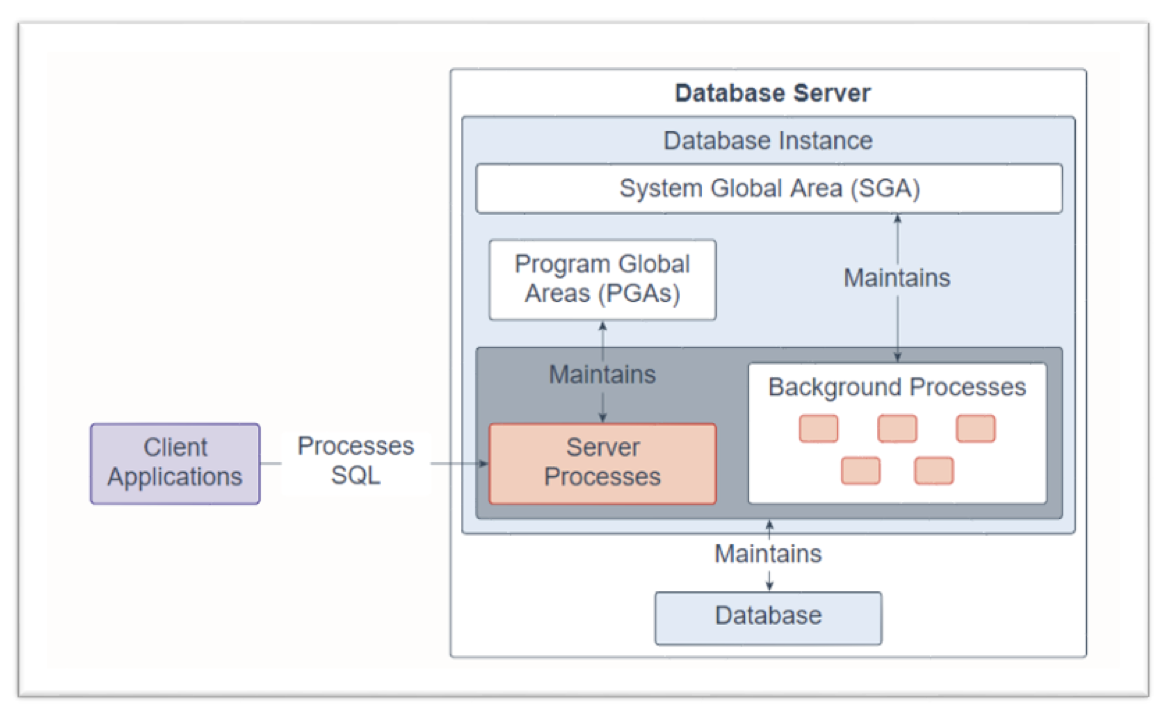
Oracle is a database server that manages a large amount of data in a multiuser environment so that
- users can concurrently access the same data.
- unauthorized access is prevented
- efficient solution for failure solutions
It consists of
- database: set of files, located on a disk, that stores data. These files can exist independently of a database instance
- database instance: set of memory structures that manages the database file
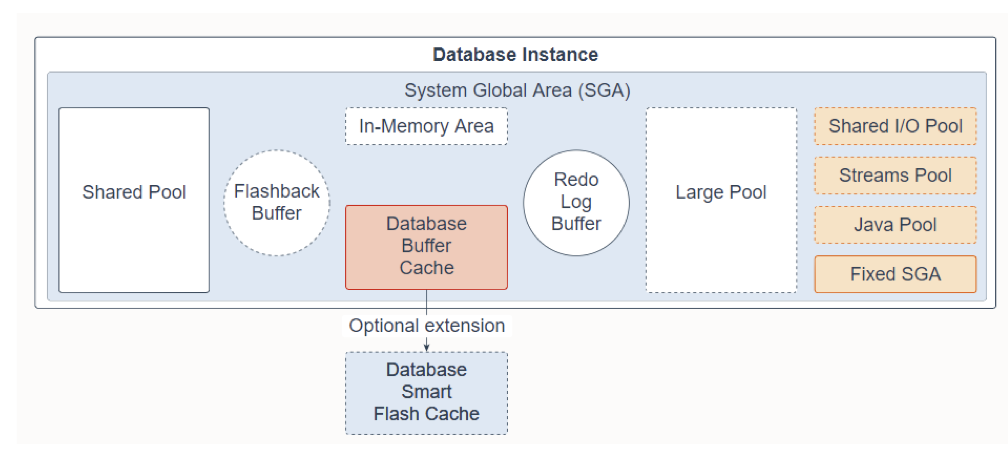
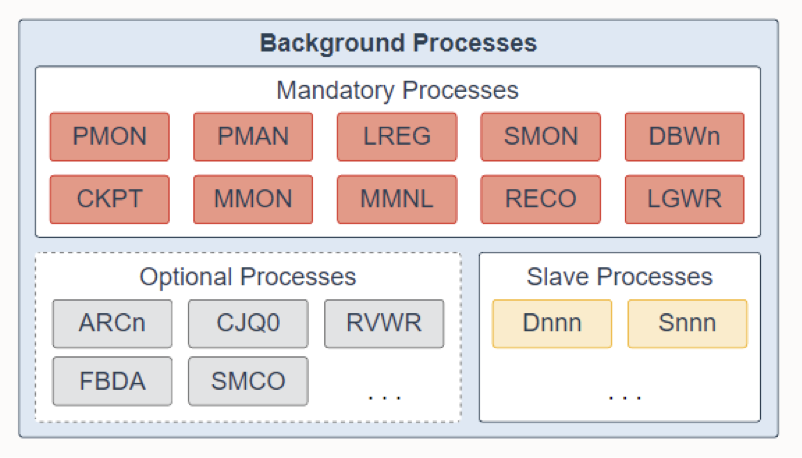
- an instance should have a shared memory area, called system global area (SGA) and a set of background processes.
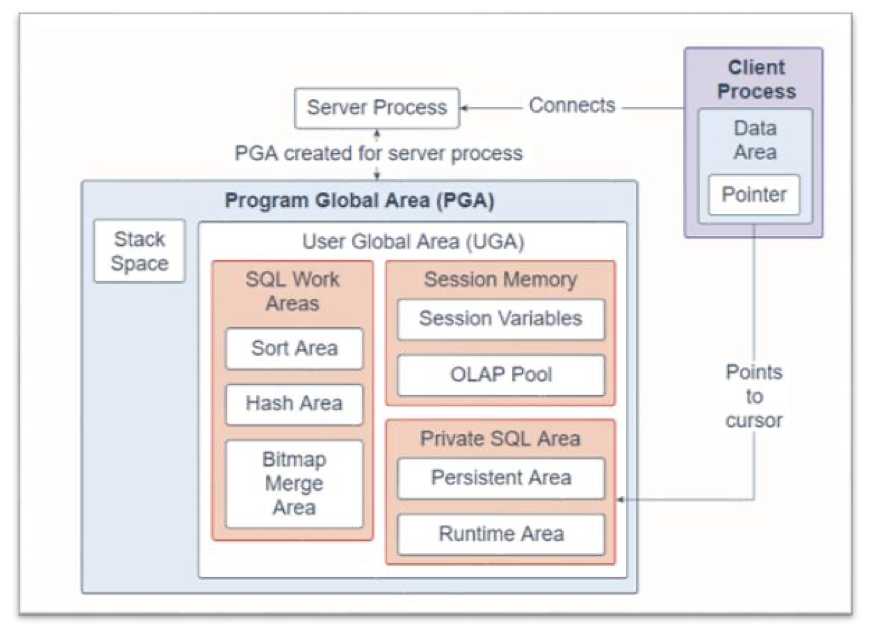
- For each user connected to the instance, a client process runs in the application. Each client process is associated with its own server process. Each service process has its own private session memory, known as the program global area (PGA).
Database and instance:
System global area:
Program global area:
Background processes:
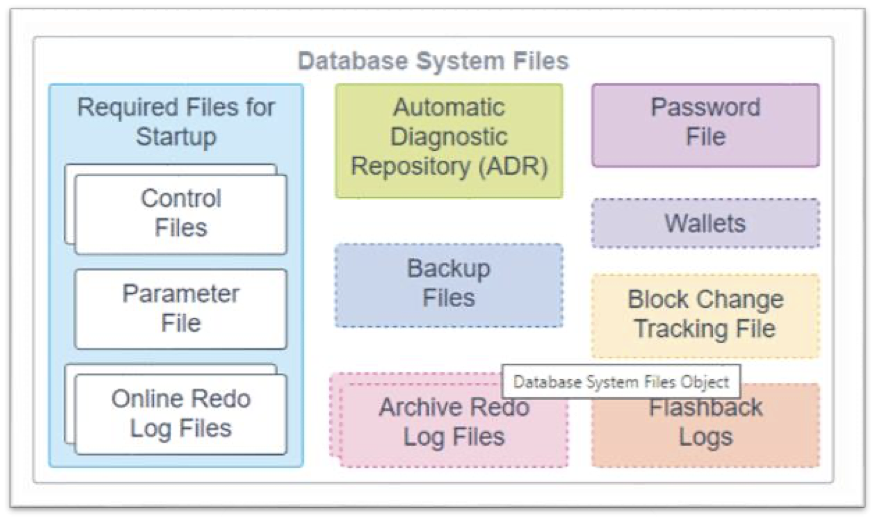
Database system files:
Data Dictionary
A data dictionary is a read-only set of tables that provides administrative metadata about the database. It is a central part of a data management for every Oracle database. It contains the following:
- definitions of every schema object, like default values for columns and integrity constraint information. For example, this data dictionary is modified every time a DDL statement is issued.
- the amount of space allocated for and currently used by the schema objects
- names of Oracle Database users, privileges and roles granted to users, and auditing information related to users.
- base tables that store information about the database. Only Oracle Database should write to and read these tables
- views that contain the name and descriptions of all objects in the data dictionary. Some are accessible to all database users, whereas others are for administrators only.
- In a dictionary view set, the prefix
DBA_is restricted to database administrators and contains all objects,ALL_is restricted to all users and contains objects to which that user has privleges, andUSER_is restricted to all users and contains the objects owned by a user.
- In a dictionary view set, the prefix
Dictionary examples
SELECT * FROM dictionary
SELECT * FROM user_tables
SELECT * FROM user_catalog

DESCRIBE user_objects;

SELECT object_name, object_type, created, status
FROM user_objects
ORDER BY object_type;
DESCRIBE user_tables;
SELECT table_name
FROM user_tables;
SELECT column_name, data_type, data_default, data_precision, data_scale, nullable
FROM user_tab_columns
WHERE table_name = 'EMPLOYEES';SELECT CC.constraint_name, C.constraint_type, CC.table_name, CC.column_name, C.delete_rule, C.status, C.last_change
FROM user_cons_columns CC, user_constraints C
WHERE CC.constraint_name = C.constraint_name AND CC.table_name in ('EMPLOYEE');Database Administrator
Database administrator's responsibility is to:
- coordinate all activities of a database system, so they need good understanding of the enterprise's information resources adn needs
- define storage structure and access method
- modify schema and phsycal organization
- grant users authority to access the database
- backup data
- monitor performance and respond to change
Tablespace
Used for storage management.
The data file contain the data from the database. These files are logically grouped into a structure called tablespace. It is a logical unit of storage, and is composed of one or more physical files. Administration operations are performed by working with tablespace.
Permanent tablespaces are
SYSTEM- Necessary on creation of database because it is used to manage the database.
- Includes the following information, all owned by the SYS user:
- The data dictionary
- Tables and views that contain administrative information about the database
- Compiled stored objects such as triggers, procedures, and packages.
SYSAUX- An auxiliary tablespace to
SYSTEM. It is the default tablespace for many Oracle Database features and products that previously required their own tablespaces. By using one, it reduces the number of tablespaces and it reduces the the load on the SYSTEM tablespace. - Database creation or upgrade automatically creates the SYSAUX tablespace.
- An auxiliary tablespace to
UNDO- a logically managed tablespace reserved for system-managed undo data.
- contains data file
- a temporary tablespace contains transient data that persists only for a duration of asession.
- no permanent schema objects can reside in a temporary tablespace
Temporary tablespaces:
TEMP
A tablespace can have two states:
- online: available to applications and DBs
- offline: data is not avail, though the DB is running.
A tablespace can either be a bigfile or a smallfile tablespace
- smallfile tablespace can contain multiple data files or temporary files, but the files cannot be as large as in a bigfile tablespace. This is the default tablespace type
- a bigfile tablespace contains one very large data file or temporary file. This type of tablespace can do the following:
- increase the storage capacity of a DB
- reduce the burden of managing many data files and temporary files
- perform operations on tablespaces rather than individual files.
To create a tablespace
CREATE TEMPORARY TABLESPACE temp_demo
TEMPFILE 'temp01.dbf' SIZE 5M AUTOEXTEND ON;

CREATE TABLESPACE tbs_02
DATAFILE 'diskb:tbs_f5.dbf' SIZE 500K REUSE
AUTOEXTEND ON NEXT 500K MAXSIZE 100M;

CREATE UNDO TABLESPACE undots1
DATAFILE 'undotbs_1a.dbf’
SIZE 10M AUTOEXTEND ON
RETENTION GUARANTEE
To alter an existing tablespace or its data/temp files, use ALTER TABLESPACE
DROP TABLESPACE can be used to remove a tablespace from a DB.
Security
Security refers to the protection of the DB against unauthorized intentional or intentional access. DB security refers to the mechanisms that protect the DB against threats which includes: authorization, access controls, backup and recovery.
User Accounts
User accounts are granted appropriate database access and privileges and are required for users to access your database. It is identified by a user name and defines the attributes which include:
- auth method
- password for db auth
- default tablespaces for permanent and temporary data storage
- tablespace quotas
- account status (locked vs unlock)
- password status (expired or not)
the CREATE USER statement is used to create and configure a database user
CREATE USER sidney
IDENTIFIED BY out_standing1
DEFAULT TABLESPACE example
QUOTA 10M ON example
TEMPORARY TABLESPACE temp
QUOTA 5M ON system
PASSWORD EXPIRE;
the ALTER USER statement is used to change the authentication or database resource characteristics of a database user
LTER USER sidney
IDENTIFIED BY second_2nd_pwd
DEFAULT TABLESPACE example
DROP USER is used to remove a database user and optionally remove the user's objects
User accounts DROP USER Examples: DROP USER sidney;

DROP USER sidney CASCADE;
User Privileges
When you create a user account you must also grant the appropriate system privileges, object privileges, and roles to the account.
- If the user will be creating database objects, then give the user account a space usage quota on each tablespace in which the object will be created.
- Oracle recommends that you grant each user just enough privileges to perform his jobs, and no more.
User privileges provide the basic level of database security because they control user access to data and limit the kinds of SQL statements that a user can execute.
- privileges must be grant to connect to database, run queries, make updates, create schema objects, and more.
The types of user privileges are:
- system privileges: a system privilege gives a user the ability to perform a particular action, or to perform an action on any schema objects of a particular type, like
CREATE TABLEorCREATE USER. - object privileges gives the user the ability to perform a particular action on a specific schema object. E.g., the privilege to select rows from the
EMPLOYEEStable.
Roles
Roles make it easy to manage privileges. They are groups of related privileges. Create roles, grant systems and object privileges to the roles, and then grant roles to the users or other roles.
CREATE ROLE statement creates a role
CREATE ROW dw_manager;
CREATE ROW dw_manager IDENTIFIED BY warehouse;
ALTER ROLE modifies a role
ALTER ROLE warehouse_user NOT IDENTIFIED;

ALTER ROLE dw_manager IDENTIFIED BY data;
DROP ROLE deletes a role
DROP ROLE dw_manager;GRANT statement will grant privileges. Privileges can be
- system privileges to users and roles
- roles to users: the granted roles can be user-defined (local or external) or predefined (
CONNECT,RESOURCE,DBA, etc) - object privileges for a particular object to users and roles.
Granting System Privileges to a Role:
GRANT CREATE SESSION TO hr;
GRANT CREATE ANY MATERIALIZED VIEW , ALTER ANY MATERIALIZED VIEW , DROP ANY MATERIALIZED VIEW , QUERY REWRITE , GLOBAL QUERY REWRITE TO dw_manager;
Granting Object Privileges to a Role:
GRANT SELECT ON sh.sales TO warehouse_user; GRANT SELECT, UPDATE ON emp_view TO PUBLIC;The REVOKE statement can be used to revoke system privileges, roles, or object privileges. For example
--Revoking a System Privilege from a User:
REVOKE DROP ANY TABLE FROM hr, oe;
REVOKE CREATE TABLESPACE FROM dw_manager;
-- Revoking an Object Privilege from a User:
REVOKE DELETE ON orders FROM hr;
GRANT SELECT, UPDATE ON emp_details_view TO public;
Profiles
A profile is a mechanism that limits the use of resources, with a name that can be assigned to a user. Resources can be:
- CPU time per call and/or per session
- number of logical reads per call and/or per session
- number of sessions open at the same time by a user
- idle time per session
- total duration of a session
Profiles can be used to implement the following functionality:
- account lockout after a certain number of failed login attempts
- password lifetimes
Use CREATE PROFILE to create a profile, which can be assigned to a user
CREATE PROFILE name_profile LIMIT
PASSWORD_REUSE_MAX 10
PASSWORD_REUSE_TIME 30;
CREATE PROFILE name_profile LIMIT
SESSIONS_PER_USER 3
IDLE_TIME= 30
FAILED_LOGIN_ATTEMPTS 3
PASSWORD_LIFE_TIME 30
PASSWORD_REUSE_TIME 180;
ALTER PROFILE to modify a profile:
ALTER PROFILE name_profile LIMIT
PASSWORD_REUSE_TIME 90
PASSWORD_REUSE_MAX UNLIMITED;

ALTER PROFILE name_profile
LIMIT SESSIONS_PER_USER 5;
DROP PROFILE deletes a profile:
DROP PROFILE app_user CASCADE;Table Index
the index allows quick access to the records in the table when you run a search based on the index key. The index is one or more objects in the database, is stored in the dictionary, and needs its own storage space. It is defined on one or more columns of a table, which constitute the index key.
Oracle provides several indexing schemes:
- b-tree indexes (balanced trees)
- excellent retrieval performance for a wide range of queries, including exact match and range searches.
- good for primary key and highly selective indexes
- subtype b-tree indexes include: index-organized tables, reverse key indexes, descending indexes, b-tree cluster indexes
- bitmap and bitmap join indexes
- function-based indexes
- application domain indexes
An index can be unique or non-unique.
- unique: index key value is present only once in the table
- not unique: index key value can be present multiple times in the table
Unique indexes should not be created explicit. Rather, define integrity constraints (PRIMARY KEY or UNIQUE) for which Oracle automatically creates unique indexes. Non-unique indexes, on the other hand must be explicitly created.
Selecting indexes: candidate columns for indexing are the columns often included in WHERE clauses in selective queries.
- recommended to use an index when the query returns between 5% and 10% of the records in the table.(If a query uses an index that returns more than 10% of the records, oracle would have better performance fully traversing the table than using the index).
- This implies that column values are relatively unique and that the
WHEREconditions are selective. - Also implies that column values with few distinct values need not be indexed. E.g., Gender
- This implies that column values are relatively unique and that the
- Small tables don't need indexes
- Do not use index columns where it
IS NULL
Advantages of index:
- improves the performance of queries (
SELECT,UPDATE, andDELETE) that use the index key in theWHEREclause.
Disadvantages:
- a large volume of storage is required
- performance of updates is degraded (
INSERT,UPDATE,DELETE) which is why you should not index all the columns of a table
Adding indexes to a schema is a common task in many db projects.
- occurs after db contains some data, and queries are slow.
- avoid premature optimization / always find out what the db is doing first
- indexes impose an overhead in space and time.
- always verify that a new index is being used by a database. if not, get rid of it.
CREATE INDEX example:
SELECT First_name, Lname
	FROM Employee
	WHERE UPPER(Lname)= "SMITH"

CREATE INDEX upper_ix ON Employee (UPPER(Lname));
SELECT First_name, Lname
FROM Employee
WHERE ((Salary*Commission_pct) + Salary ) > 15000
CREATE INDEX income_ix ON Employee(Salary + (Salary*Commission_pct));ALTER INDEX changes or rebuilds an existing index. DROP INDEX removes an index from the database.
Views of a data dictionary allow you to obtain information from the indexes. DBA_INDEXES, DBA_IND_COLUMNS, USER_IND_COLUMNS, INDEX_STATS.
Read more on Oracle 19 Indexes and Index-Organized Tables
Query Processing
Step 1: Query Analysis
- Generate a tree representation of the query structure. Check SQL Syntactic
- Preprocessing: semantic checks
- relations: tables exist in the db
- attributes: defined for the tables
- types: types of the attributes used in the conditions are compatible
Step 2: Rewrite the query, or the logical plan of the query
- tree transformation to relational algebra
- algebraic optimization rules:
- commutativity / associativity
- lower selections (reduces the number of tuples)
- lower projections (reduce size)
- remove subqueries from conditions.
Step 3: Generation of a physical execution plan: type of optimizations.
- rule based optimization: general heuristics based on the experience of the administrators or designers
- cost based optimization: estimation of the costs of performing a physical operation. Depends on:
- structure size: statistics
- memory size: depends on the processes running simultaneously
The ORACLE cost-based optimization query optimizer is a built in db software that determines the most efficient method for a SQL statement to access requested data.
- It's purpose is to generate the most optimal execution plan for a sql statement by choosing the plan with the lowest cost among all considered candidate plans. It will use available statistics to calculate the cost.
- All SQL statements use the optimizer.
- E.g., for a query that might request information about employees who are manager. If the optimizer statistics indicate that 80% of employees are managers, then it may decide a table scan is most efficient. Alternatively, it can read an index instead followed by a table access by row_id. Other access methods other than table scan or index scan include different join methods like nested loop or hash joins, different join orders, or transformations.
Cost-based optimization.
- The optimizer cost model accounts for the machine resources that a query is predicted to use. They include:
- system resources, which includes estimated I/O, CPU, and memory
- estimated number of rows returend
- size of initial data set
- distribution of data
- access structures
- Then the optimizer assigns a relative numeric cost to each step of a possible plan for a given query and environment.
- After calculating the cost of the alternative plans, the optimizer chooses the cheapest plan. This is called the execution plan. It shows the combination of the steps that Oracle Database will use to execute a SQL statement.
EXPLAIN PLAN statement displays the execution plans that the optimizer chooses for SELECT, UPDATE, INSERT, and DELETE statements.
How do we tell what indexes the DB uses for a query? How do we create additional indexes on our tables
- use the optimizer cost and query planner (execution plan) looks for indexes on relevant columns and optimizing your query
Views:
V$SQL_PLANV$SQL_PLAN_STATISTICSV$SQL_PLAN_STATISTICS_ALL``
Transaction
A transaction is an atomic unit of work that should either be completed in its entirety or not done at all. For recovery purposes, the system needs to keep track of when each transaction starts, terminates, and commits, or aborts.
- Example of an atomicity requirement: if the transaction steps fails (due to hardware or software) after step 3 and before step 6, money will be "lost," leading to an inconsistent database state. The system should ensure that updates of partially executed transactions are not reflected in the database.
Durability requirement: once a user has been notified that a transaction is complete, the updates to the database by the transaction must persist even if there are software or hardware failures.
Transaction operations:
BEGIN_TRANSACTIONREADorWRITEEND_TRANSACTIONCOMMIT_TRANSACTIONROLLBACK(orABORT)
Transaction states
- Active: during the initial state; the transaction stays in this state while it is executing
- Partially committed: after final statement has been executed
- Failed: after the discovery that normal execution can no longer proceed
- Aborted: after the transaction has been rolled back and the database restored to its state prior to the start of the transaction. Two options when this happens:
- restart the transaction (only if no internal logical error)
- kill the transaction
- committed: after successful completion
ACID properties
- atomicity: either all operations of the transactions are properly reflected in the database or none are
- consistency: execution of the transaction in isolation preserves the consistency of the database
- isolation: although multiple transactions may execute concurrently: each transaction must be unaware of other concurrently executing transactions. I.e., intermediate transaction results must be hidden from other concurrently executed transactions.
- durability: after a transaction completes successfully, the changes it has made to the database persist, even if there are system failures.
All oracle transactions obey the basic properties of a db transaction, known as ACID properties
Transaction control uses the following statements:
COMMITends the current transaction and makes all changes performed in the transaction permanent. It also erases all save points in the transaction and releases transaction locksROLLBACK(orABORT)- reverses work done in the current transaction; causes all data changes since the last
COMMITorROLLBACKto be discarded. WhenROLLBACK TO SAVEPOINT, undoes changes from last statement but does not end the entire transaction
- reverses work done in the current transaction; causes all data changes since the last
SAVEPOINTstatement identifies a point in the transactions to which you can later roll back.
Recovery
DBMS provides tools to avoid and remedy failures. For any type of failure, the administrator must ensure that after an update, the db is in a consistent state. To do this the backup administration should:
- plan and test responses to different kind of failures
- configuring the db env for backup and recovery
- setting up a backup schedule
- monitoring the backup and recovery environment
- troubleshooting backup problems
- recovering from data loss if the need arises
A recovery system consists of restoring the db to a state that is known to be correct, after any failure that has left it in an incorrect or at least suspicious state.
The goal is to protect the db against data loss and reconstruct the db after data loss.
Oracle provides support to auto failure recovery, recovery processes vary depending on the type of failure that occurred and the structures affected.
Recovery structures:
- redo log file
- control files
- rollback segments
- backups
failure types:
- media failures: they are a physical problem with a disk that causes a failure of a read from or write to a disk file that is required to run the db.
- user errors: error in application logic or manual mistake (data in database is changed or deleted incorrectly). Appropriate recovery technique is a combination of the management of privileges and backup strategy
- application errors: software malfunction can corrupt data blocks. In physical corruption, the data does not recognize the block. If not extensive corruption, repare with block media recovery.
In oracle, there are redo log files, which store the changes produced in the DB. They are organized in groups written in a circular way, therefore, saved info is periodically deleted.
They can be applied in a backup copy to guide and reproduce all modifications produced between the backup and an incident that has damaged the db.
- can be recovered from a failure of 1+ transactions by undoing or redoing the operations individually transaction by transaction, from the redo log file. This means the redo log files must be in
ARCHIVELOGmode.
Every oracle database file has a control file, which is a small binary file that records the physical structure of the database. In incldues:
- database name
- name and location of associated data file and redo logs
- timestamp of database creation
- current log sequence number
- checkpoint information
Without the control file, the database cannot be mounted and recovery is difficult. It guides the recovery process.
A rollback segment is an object that the oracle database uses to store data necessary to reverse or undo changes made by transaction. They store transactions that have yet to be validated.
The primary task of a backup administrator is making and monitoring backup for data protection.
- backup is a copy of data of a database that you can use to reconstruct datat
- a backup can either be a physical backup or a logical backup.
A physical backup are copies of physical database files and storing database information to some other location (like a disk or tape).
- cold (offline) backups: db must be stopped in normal mode and copy the files on which it sits. Once the copy is made, the db can be restarted
- hot (online) backup: copy is made while the db is open and running in
ARCHIVELOGmode. Copies all the file corresponding to a given tablespace or for all the tablespaces in tge db.
A logical backup contains logical data (like the tables and stored procedures)
Recovery strategies:
- physical backups are the foundation of any sound backup and recovery strategy
- Oracle Recovery Manager (RMAN) utility: simplifies backup, stores, and recovery processes. Used in CLI or GUI mode. It can be used with/without a retrieval catalog, but use of one provides additional functionality. Backups created can be images (exact duplicate which can be restored from without additional processes) or backup sets (backup in a proprietary format that consists of one or more physical files))
- Operating system utilities (user-managed)
- logical backups are used to supplement physical backup. Otherwise, they are not sufficient protection against data loss alone.
- Extract with Oracle utility (export utility) and stored in a binary file
In general, the typology of failures is:
- local failures to the transactions, which are detected in the application code --> responsibility of the programmer
- local failures to the transaction, which are not detected by the application code --> DBMS forces rollback of the transaction
- system failures that do not damage the db --> hot recovery process, log files is consulted to undo or redo
- system failures that damage db --> Emergency recovery: physical backup + recovery based on the log file.
- fatal error (loss of log file(s)) --> cold recovery: backup, lost of last transactions.
Starting up requires three steps and combines the creation of an instance and the start of the db:
-
start an instance with
connect internal startup nomount -
mount a db:
alter database mount -
open a db:
alter database open -
alternatives: with a single command (
startup), only for DBA (startup restrict), forced startup (startup force)
Shutting down three ways:
- normal: in waiting state because there are users still connected. It does not allow new connections. Recovery is not performed during subsequent book:
shutdown - immediate: current connections are completed. Recovery is not performed during subsequent boot:
shutdown immediate - aborting: drastic stop, does not wait for current connections to complete. Recovery is required during a subsequent boot:
shutdown abort.
Linked from Databases