NoSQL Databases
NoSQL Database
Introduction
Web 2.0 led to more information share . Data becomes the most important. Systems must always be online.
Big data is the intelligence use of information. It has exponential growth. Characterized by 7 parameters:
- volume
- velocity (quickly analyzable)
- variety (structured / unstructured)
- variability (meaning constantly changing)
- veracity (truthful)
- visualization (presentable in comprehensible way)
- value (information helps with decision making)
Big data causes some issues:
- no available storage for more data
- no tools to process so much data
- therefore arise nosql database
NoSQL appeared in 1998. The term understood today became popular in 2009. Implemented by BigTale, Google. DyanmoDB, Amazon and Cassandra, Facebook.
The taxonomy of NoSQL: aggregation data models are used to treat structured and unstructured data. Graph data models are useful in real-world domains with multiple and complex interrelationship (social network).
Some models from least to most semantic expressivity:
- key-value (aggregation oriented model)
- column oriented (aggregation oriented model)
- document oriented (aggregation oriented model)
- graph oriented
NoSQL features:
- Structured, semi-structured and unstructured data. Heterogeneous data
- No single data model
- Flexible data scheme
- No standard data access language
- Horizontal scalability
- Distributed DB
- ACID properties are not guaranteed
Features in a flexible data scheme (schema-less)
- scheme is defined implicitly based on the data inserted
- scheme can be non-exist in some DBMS
- Advantages: change in DB scheme, heterogeneous data, query operations are optimized (no join operations needed).
Features of having no standard data access lnaguage:
- access via api or your own data manipulation language
- different programming languages can be used to access
- mechanisms are provided to allow integration with distributed computing systems (like MapReduce)
NoSQL Db is based on "horizontal scalability" as opposed to relational DB that are based on "vertical scalability." This makes it possible to grow according to the needs. Add new nodes to the network without having to stop the system.
The processing and storage of data is done in a distributed way through a network of computers.
Distributed DB featuers
- horizontal fragmentation (sharding)
- data replication
- dispersion techniques, hash (key-value db)
- value of attributes (document-oriented DB, column-oriented)
- vertical fragmentation (column-oriented)
- Advantages: parallelism, query efficiency
Transaction and data consistency models:
- transaction is a relational model: a sequence of operations to be executed atomically.
- ACID model is complex for non-sql databases, therefore NoSQL databases follow an alternative transaction model called BASE.
- limited availability (BA)
- Flexible state (SS)
- Final consistency over time (EC)
CAP Theorem: a distributed system must gaurantee two:
- consistency: ability to retrieve the same values for the same data
- availability: requests to an available node must be answered
- partition tolerance: provide service to users despite failure situation.
- Examples
- AP: always available, though may temporarily show inconsistent data (in the presence of partitions): RIAK, DynamoDB, Cassandra
- CP: consistent but not always available: Mongo, HBase, Redis
Disadvantages:
- low portability: no unified query languages, so its hard to make applications portable
- complex data scheme
- complex administration db tasks: no administration functions in dbms
- lack of maturity
- learning curve
NoSQL DB Types
Aggregate means that a set of real-world objects are interrelated and treated as indivisible data unit for access. Each aggregate is identified by a key. Is the minimum unit of exchange between application and programs and for concurrency control and integrity
Key-Value Data Model
Simplest model with the least semantic expressiveness.
Each element is uniquely identified by a key: (Id, Aggregate) == (Key, Value)
- Atomicity at the key level.
- The Db does not know the structure of the aggregate (black box, opaque).
Advantage:
- high performance of read / write
- a lot of speed in consultations
- easy to climb
- easy to implement
The application will give structure to the "value" and interpretes it (for example, with an XML)
DBMS extend key-value models
- the extend the semantics of aggregates and incorporate relationships between aggregates
common model:
- dynamodb
- oracle berkeley db
- redis
- riak
Document-oriented data model
- extension of the key-value model.
- aggregates have an internal "document" structure that is stored in JSON format, XML among others.
- DB knows how to interpret the internal structured
- Aggregate can be accessed via the key or the content through document attributes.
- Documents can be added in collections.
- Retrieve, modify part of a document, and create indexes on attributes
- atomicity at the document level.
{
	“orderId”: 500,
	“date”: “15/06/2018,
	“clientId”: 50.000,
	“paymentId”: 10,
	“order_line”: [
		{
			“productId”:25,
			“productName”: “Moa”,
			“numUnits”: 1,
			“price”: 19,99
		}
	],
“order_address”: [
		{
			“street”: Alcala, 140,
			“postalCode”: 28028,
		}
	]
}- the key is
orderId, everything else is document - references are
date,clientId, `paymentId - embedded documents are
order_lineandorder_address
common products:
- mongodb
- couchdb
- marklogic
Column oriented data model
Data is in 2D matrix
- rows are data aggregations accessed by the key
- columns are attributes of the aggregations represented by the triplet:
<name, value, timestamp> - atomicity at the row-level
- columns can be grouped into family (a family represents a concept of aggregation)
- example: aggregate "teacher" has two families: personal information adn academic information
advantages:
- suitable for applications with distributed files
- less scalable than db key-values
- slower in writing
- reading speed
- efficient when inserting multiple records at the same time (column blocks) and when accessing only some columns.
Common modesl:
- cassandra
- apache hbase
- amazon simple db
- hypertable
Graph oriented data mdoel
Uses graph structures to represent and store teh data
Two basic elements:
- nodes: represent real-world concepts and objects
- edges: explicitly represent the relationship between nodes
Types: directed or not directed.
Good for
- highly related data; few objects with many relationships
- useful when information can be represented as a network
Tagged graphs; semantics are provided by assigning labels to nodes and edges.
Property graphs tagged: tags can be insufficient, so you need to assign properties to nodes adn edges (name: value)
Characteristics
- Explicit relations: improvement in response time in queries
- not easily scalable
- scheme is implicit in the strucutre of the graph
- high-level langauges
- model constraints: edges without origin/destination nodes are not allowed. Nodes can only be removed when they are orphans
Example:
- neo4j
- blaze graph
MongoDB
MongoDB is a noSQL database (documented-oriented database model) with a flexible data scheme with json-like documents. The json is stored in binary format with some extensions.
Other characteristics:
- use json documents to store records
- general purpose
- open source dbms
- multiplatform: unix, linux, windows, mac
- drivers exist for multiple programming language
Document structure:
- related data can be embedded within a signle document
- references store the relationship between data by including link or references from one document to another. (
user_id: <ObjectId1>)
Data Modeling
For one to one relationships, use embedded documents. (dictionary in dictionary)
For one to many relationships, use embedded documents (array of dictionary in dictionary). Or, use references between documents. (array of ids in dictionary)
Shell command
Command helpers
helpshows helpdb.help()shows help for database methodsdb.<collection>.help()shows help on a collection methods.
Print commands
show dbsprints all databases on the servershow collectionsprints all the collections for the current db
Create and switch db
use <db>switches current database to<db>and the mongo shell variabledbis set to the current database
Crud methods
db.<collection>.<method>(<filter>, <options>)
-
db.<collection>.insetOne()inserts a document into the collection -
db.<collection>.insertMany()inserts multiple documents into the collection -
db.<collection>.find()selects documents in a collection based on the filter and returns cursor to the selected documents.db.user.find( // colection users {age: {$gt:18}}, // query criteria {name:1, address: 1} // projection ).limit(5) // cursor modifier -
db.<collection>.updateOne()updates a single document based o the filter -
db.<collection>.updateMany()updates all documents within the collection to match the filter -
db.<collection>.replaceOne()replace a single document within the collection based on the filter -
db.<collection>.deleteOne()removes a single document from a collection based on the filter -
db.<collection>.deleteMany()removes all documents that match the filter
Query filter parameters:
{a: 10}Docs whereais 10 or an array containing the value 10.{a: 10, b: "hello"}Docs whereais 10 andbis "hello".{a: {$gt: 10}}Docs where a is greater than 10. Also available:$lt(<),$gte(>=),$lte(<=), and $ne(!=).{a: {$in: [10, "hello"]}}Docs whereais either 10 or "hello".{a: {$all: [10, "hello"]}}Docs whereais an array containing both 10 and "hello".{"a.b": 10}Docs whereais an embedded document withbequal to 10.{a: {$elemMatch: {b: 1, c: 2}}}Docs whereais an array that contains an element with bothbequal to 1 andcequal to 2.{$or: [{a: 1}, {b: 2}]}Docs whereais 1 or b is 2.{a: /^m/}Docs where a begins with the letter m. One can also use the regex operator:{a: {$regex: "^m"}}{a: {$mod: [10, 1]}}Docs where a mod 10 is 1.{a: {$type: "string"}}Docs whereais a string.{$text: {$search: "hello"}}Docs that contain"hello"on a full text search.
not indexable queries:
a: {$nin: [10, "hello"]}}Docs whereais anything but 10 or "hello".{a: {$size: 3}}Docs whereais an array with exactly 3 elements.{a: {$exists: true}}Docs containing an a field.{a: /foo.*bar/}Docs where a matches the regular expression foo.*bar.{a: {$not: {$type: 2}}}Docs where a is not a string.$notnegates any of the other query operators.
field update operators
{$inc: {a: 2}}Increment a by 2.{$set: {a: 5}}Set a to the value 5.{$unset: {a: 1}}Delete the a key.{$max: {a: 10}}Set a to the greater value, either current or 10. If a does not exist, set a to 10.{$min: {a: -10}}Set a to the lowest value, either current or -10. If a does not exist, set a to -10.{$mul: {a: 2}}Set a to the product of the current value of a and 2. If a does not exist set a to 0.{$rename: {a: "b"}}Rename field a to b.{$setOnInsert: {a: 1}}. {upsert: true}Set field a to 1 in case of of insert operation.{$push: {a: 1}}Append the value 1 to the array a.{$push: {a: {$each: [1, 2]}}}Append both 1 and 2 to the array a.{$push: {a: {$each: [10, 20, 30], $slice: -5}}}Append 10, 20, and 30 to the array a, then trim the resulting array to contain only the last 5 elements.$slicecan only be used with the$eachmodifier. Negative values trim to the last<num>elements, while positive values trim to the first<num>elements{$push: {a: {$each: [50, 60, 70], $position: 0}}}Insert 50, 60, and 70 starting at position 0 of the array a.$positioncan only be used with the$eachmodifier.{$addToSet: {a: 1}}Append the value 1 to the array a (if the value doesn't already exist).{$addToSet: {a: {$each: [1, 2]}}}Append both 1 and 2 to the array a (if they don't already exist).{$pop: {a: 1}}Remove the last element from the array a.{$pop: {a: -1}}Remove the first element from the array a.{$pull: {a: ($gt: 5}}}Remove all values greater than 5 from the array a.{$pullAll: {a: [5, 6]}}Remove multiple occurrences of 5 or 6 from the array a.
Aggregation
Aggregations allows the grouping and processing of documents from a collection or a filter applied to a collection. It can be of three types:
- Simple
- the
count()anddistinct()methods select documents from a collection and count them or extract the unique values.- E.g.,
db.books.distinct('Title’). - method
db.collection.count([query])indicates the number of documents satisfying the query (or the total number of documents in the collection if the query is omitted). The same result can be obtained withdb.collection.find([query]).count(), though the underlying mechanism differs. - istinct values of a field within the documents of the collection are provided by the method
db.collection.distinct(field,[query])(optionally, for documents satisfying the query)."
- E.g.,
group()indicates the subset to process and provides a processing function. It needs a group key: creates a collection with distinct values from a grouping key (field or set of fields). Aggregation: additional fields can be added with an aggregation function. Essentials are:- criterion (key): defines the grouping criteria (can be replaced with a function (
keyf) that returns a document to serve as the grouping criterion) - initialization (initial) sets up a prototype document
- projection (reduce): use an aggregation function as follows:
db.my_col.group({ key:{attribute:1 [,… ]}, [cond:{query},] initial: {initialization}, reduce: <aggregation_function> [, finalize: {outputs}] });
- criterion (key): defines the grouping criteria (can be replaced with a function (
- E.g.,
// ‘Wines’ Collection with Five Documents:
db.vinos.insert([ {It:'X',age:6}, {It:'Y',age:5},
	{It:'X',age:3}, {It:'X',age:3}, {It:'Y',age:12} ]);
// Grouping everything by the 'It' key will result in two documents: {It: 'X'}, {It: 'Y'}. Attributes such as count, sum of ages, and average can be added:
db.vinos.group( { key:{It:1}, initial:{card:0, suma:0},
	function(doc,res) {res.suma+=doc.age; res.card++},
	finalize: function(res) {res.media=res.suma/res.card} });
	returning: {It:'X', card:3, suma:12, media:4}, {It:'Y', card:2,
	suma:17, media:8.5}
// If no action is taken (with empty initialization and aggregation), it will return one document for each distinct value in the key (a distinct of multiple attributes):
db.vinos.group( {key:{It:1,age:1}, initial:{},
reduce:function() {} } );
- the
- Pipeline is a framework, that under the model of a pipeline of several stages, can transform the documents and calculated aggregated functions.
- Invoked with the
aggregate()method, it specifies the list of stages to execute as a parameter. - the first stage transforms / selects the collection, providing another one to work on. Each pipeline stage takes the previous collection as input and produces a new one. Upon the completion of all stages, it returns a cursor with the final collection.
- Supports large collections, even when fragmented.
- See pipeline stage operators:
$match:{query},$project:{spec},$unwind:array,$group:{spec},$out:"col_name". - Expression Operators: to add fields to the result document. Syntax:
$operator:[arg1, arg2,… argn] - There are many aggregation Operators for
$group - There are many pipeline-stage operators
- E.g.,
// Average age of all wines:
db.vinos.aggregate([{$group:{_id: null, myavg:{$avg:"$age"}}}] );

// Remove order lines for 'Arabica' coffee (Coffea):
db.coffee.aggregate({$redact:{ $cond: {if:{$eq:["$Coffea","Arabica"]},
then:"$$PRUNE", else:"$$DESCEND"} }});

// Create a collection with sales (date, barcode, quantity) in Spain:
db.coffee.aggregate([{$match:{"Address.Country":"Spain"}},
	{$project:{Orders:1,_id:0}},
	{$unwind:"$Orders"},
	{$project:{"Orders.Lines":1,"Orders.Date":1}},
	{$unwind:"$Orders.Lines"},
	{$project:{Barcode:"$Orders.Lines.Barcode", Cant:"$Orders.Lines.Quantity",
	Fecha:"$Orders.Date"}},
	{$out:"Sales"} ]);
- Invoked with the
- Map-reduce: a computing paradigm that condenses large volumes of information and calculates distributed aggregated functions
- Few steps:
- Prepares the input collection (filters, sorts, processes...).
- Each document is inspected by the map function.
- All key-value pairs emitted by the map are collected in an intermediate collection.
- The intermediate collection is grouped by key into pairs
(key, [value1, value2, …]). - Each of these pairs is subjected to a reduce function, which returns a pair
(key, valueR). - Prepares the output collection (finalize) and records it (out).
- The MapReduce Paradigm can be applied in MongoDB through the mapReduce method (which is an encapsulation of the homonymous command).
db.collection.mapReduce( map, reduce [, {opciones}] ) - Map Function: Transforms each document into zero or more key-value pairs. D
- does not receive parameters; the processed document is referenced with this.
- the result is zero, one, or several calls to the emit method emit
(key, value). - this function must not access the database nor cause side effects.
- Reduce Function: Transforms each document into zero or more documents.
- receives two parameters, the key and an array of values (emitted by map).
- the result will be a single value (of the same type as the input values) which will be provided with return.
- this function also must not access the database nor cause side effects.
- Many options for
mapReduce() - Example of creating two functions (map and reduce) to count the total number of units sold corresponding to each coffee variety:
var mymap1 = function() {
	for (var i = 0, len = this.Orders.length; i < len; i++) {
		var Ord = this.Orders[i];

		for (var j = 0, lenj= Ord.Lines.length; j < lenj; j++) {
			emit(Ord.Lines[j].Varietal,Ord.Lines[j].Quantity);
		}
	}
}

var myred1 = function(key, qtties) {
	return Array.sum(qtties)};

db.coffee.mapReduce(mymap1,myred1,{out:"ventas"});{
	"result" : "ventas",
	"timeMillis" : 2113,
	"counts" : {
		"input" : 2574,
		"emit" : 149357,
		"reduce" : 1612,
		"output" : 62
	},
	"ok" : 1
}

db.ventas.find();
- Few steps:
Practice
Labdemo 1: Introduction to MongoDB (11/5/2024)
Create new db with with use course_mongodb
View your dbs with show dbs, and it will not show up until a document has been inserted
Insert object into new collection called books: db.books.insertOne({isbn: "9781593275846",title: "Eloquent JavaScript, Second Edition", author: "Marijn Haverbeke",pages: 472});
Show all documents in a collection with db.getCollection('books').find(); or db.books.find();.
- Prettify it with
db.books.find().pretty();
Show collections with show collections
Find books with a specific publisher: db.books.find({publisher: "O'Reilly Media"});
Delete all documents that meet criteria of title match db.books.deleteOne({"title": "Eloquent JavaScript, Second Edition"});
Modify the document whose title is Learning... db.books.updateMany({title: "Learning JavaScript Design Patterns"},{{$set: {title: "Learning JavaScript Design Patterns, Second Edition"}});
to delete a db: db.dropDatabase()
Neo4j
A graph oriented data model has:
- nodes that represent real-world concepts
- edges: that explicitly represent relationship between nodes
A graph can be directed or not directed.
Use when:
- highly related data: importance of data is in its interrelationships (few objects, many relationships)
- information can be represented as a network (networks: RRSS, logistics, maps, and semantic applications)
Tagged graphs: semantics are provided by assigning labels to nodes and edges. Property graph tagged: tags may be insufficient, so you must assign properties to nodes and edges (name: value).
neo4j is a graph oriented nosql database to store information using graph structures. Made by Neo technology in 2017. There's three versions: community, enterprise, and government. Uses its own language for consultation and data manipulation: cypher.
Data Modeling
Nodes are entities and concepts
- can have properties. e.g., gender: male
- can be labeled like "person" or "movie"
Relationships are connections and interactions between notes
- can have properties.
Comparing relational model to neo4j
| Relational Model | neo4j |
|---|---|
| Database | Graph |
| Tabel, view | Node label |
| Row | Node |
| Column | Property |
| Primary key | Property and uniqueness constraint |
| Foreign key | Relationship |
| Tables join | Graph traversing |
Cypher
Cypher is Neo4j's graph query language. It allows a user to store and retrieve a data from the graph database. It is a declarative, SQL-inspired language for describing visual patterns. Open-source, open language specification.
Example
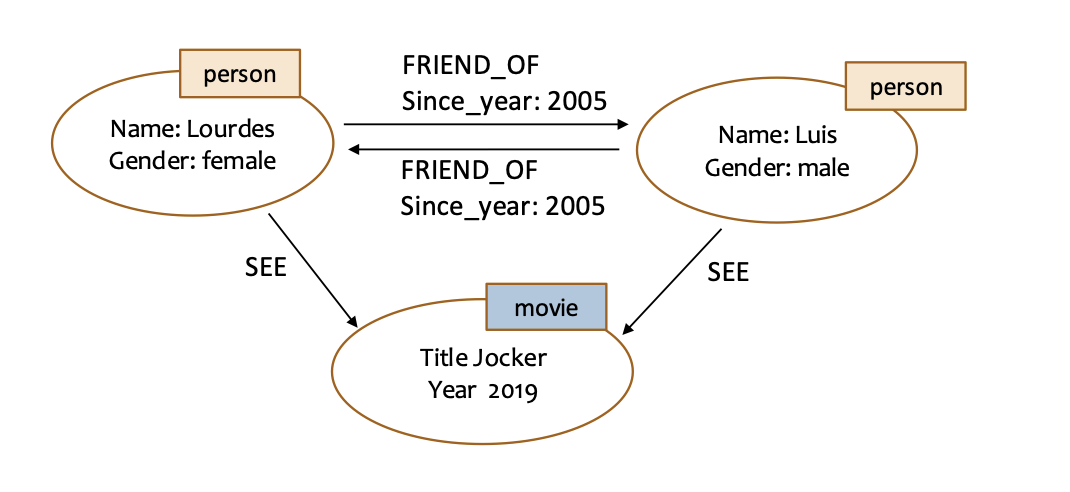
CREATE to create new nodes
CREATE (LourdesNode: person {name: 'Lourdes', gender: 'female'})
CREATE (LuisNode: person {name: 'Luis', gender: 'male'})
CREATE to create new relationships
CREATE (LuisNode)-[:FRIEND_OF {since_year:[2005]}]->(Lourdesnode),(LourdesNode)-[:FRIEND_OF {since_year:[2005]}]->(LuisNode)MATCH allows you to make queries with conditions about the data of the nodes and relationships.
Recover data from all nodes
MATCH(p) RETURN pRetrieve all nodes labeled as "person":
MATCH(p: person) RETURN pRetrieve the name and gender of all data labeled "person":
MATCH(p: person) RETURN p.Name, p.GenderRetrieve the name and gender of people named "Lourdes":
MATCH(p: person) WHERE p.Name='Lourdes' RETURN p.Name, p.GenderRetrieve the name and gender of people named "Lourdes" or the male gender:
MATCH(p: person) WHERE p.Name="Lourdes" OR p.Gender="male" RETURN p.Name, p.Gender- alternatively
p.Gender='female'will retrieve the female gender.
Linked from Databases