Memory Hierarchy
We want: lots of memory and access it fast
- We really have: different speed/size tradeoffs
- Need methods to give illusion of large and fast memory
Locality
Temporal locality
- same memory location often referenced repeatedly
- example: instructions in loops
Spatial locality
- after an item is referenced
- example: processing of sequential data
Violations of locality Consider this C code
#define size 32768

	int matrix[size][size];
	int main(void) {
	for(int i = 0; i<size; i++) {
		for(int j = 0; j<size; j++) {
			matrix[i][j] = 47;
		}
	}
	return 0;
}
Output:
$ gcc -Og cache1.c -o cache1
$ time ./cache1
real 0m1.710s
user 0m0.871s
sys 0m0.839s
But, when you do this minor change:
#define size 32768

	int matrix[size][size];
	int main(void) {
	for(int i = 0; i<size; i++) {
		for(int j = 0; j<size; j++) {
			matrix[j][i] = 47;
		}
	}
	return 0;
}
Output:
$ gcc -Og cache2.c -o cache2
$ time ./cache2
   real   0m24.601s
   user   0m23.756s
   sys    0m0.844s
- When you write your program that violates the locality system, then you can dramatically decrease performance.
Cache
- All data is in large main memory
- Data for processing has to moved to cache
- Caching strategies (mapping between cache and main memory; which data to read / keep / write)
Memory Levels
2 Level Memory
Smaller memory mirrors some of the larger memory content
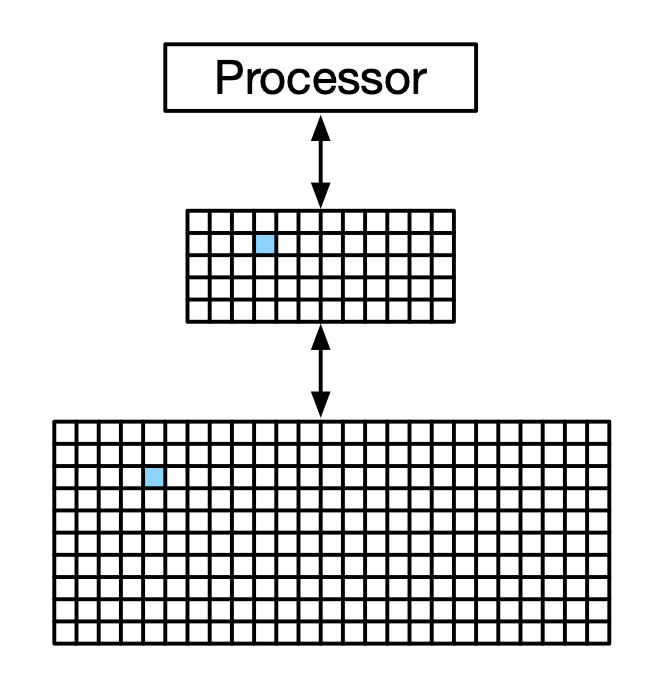
- The middle portion is called the cache
- The lower, bigger portion is the Slow DRAM
The cache helps with speed because we can find the replica in the fast cache, and the we don't have to talk to the slow DRAM.
A Cache Hit is when there is a memory request from the CPU. Data is found in the cache (called a "hit"). Cache will send the data to CPU.
The cache is smaller than the main memory, so there is a chance that data is not found. This is called a Cache Miss. Memory request comes from CPU. Data is not found in the cache. Memory request comes from the cache to the main memory. The memory sends data to the cache. The data is store din the cache, which sends the data to the CPU.
Definitions
Memory has to be transfered from large memory to be used.
- Cache: small memory connected to processor
- Block: (aka "line") unit of memory transferred
- Hit rate: fraction of memory lookups served by data already in cache. We want this to be as high as possible.
- Miss rate: fraction of memory lookups that require memory transfers
- Hit time: time to process a cache hit. (how long does it take to access data)
- Miss penalty: time to process a cache miss (how long does it take to access data, which will be much much higher than hit time)
Memory Hierarchy
There are more than 2 levels of memory. Everything beyond level 3 is considered the main memory. Transferring between memory in level i and i+1 follows the same principle, regardless of i.
Hierarchy says that if item in level i, then it is also in level i+1. Hence, we restrict our discussion to 2 levels.
Direct Mapping
Main idea: keep mapping from cache to main memory simple ⇒ Use part of the address as index to cache
- The address is broken up into 3 parts:
- memory position in block (offset). Offset is based on the block size E.g., would be 7 bits if the memory block is 128 bits. It is located in the lower address. Base 2 log.
- index. Answers which "set" is being accessed
- tag to identify position in main memory. Answers where in memory is the data coming from.
- The tag and index form the "identity" of a block in memory.
- If blocks with same index are used, older one is overwritten'
- Two blocks with the same index with different tag will 100% conflict. Same index tend to want to be close together.
Example:
Main memory address (32 bits): 0010 0011 1101 1100 0001 0011 1010 1111
A block size is 1KB (10 bytes)
Cache size is 1MB (20 bytes)
| Tag | Index | Offset |
|---|---|---|
0010 0011 1101 | 1100 0001 00 | 11 1010 1111 |
DM Cache: capacity = (# of slots) x (block size) In this example:
Cache Access
Cache content:
| Index | Valid | Tag | Mapped Memory |
|---|---|---|---|
| 000 | no | ||
| 001 | no | ||
| 010 | no | ||
| 011 | no | ||
| 100 | no | ||
| 101 | no | ||
| 110 | no | ||
| 111 | no |
After we perform read 10101
- tag is 10
- index is 101 or 5
- It's a cache miss, and we retrieve the value from main memory
We also perform read 11010
- It's a cache miss
| Index | Valid | Tag | Mapped Memory |
|---|---|---|---|
| 000 | no | ||
| 001 | no | ||
| 010 | yes | 11 | 11010 |
| 011 | no | ||
| 100 | no | ||
| 101 | yes | 10 | 10101 |
| 110 | no | ||
| 111 | no |
We can now perform read 10101 and it will be a cache hit.
Now, what if we do read 10010.
- It's a cache miss so we must retrieve value from main memory
- Overwrite existing cache value
| Index | Valid | Tag | Mapped Memory |
|---|---|---|---|
| 000 | no | ||
| 001 | no | ||
| 010 | yes | 10 | 10010 |
| 011 | no | ||
| 100 | no | ||
| 101 | yes | 10 | 10101 |
| 110 | no | ||
| 111 | no |
Block size Tradeoffs
-
Larger block size results in
- fewer cache misses due to spatial locality
- longer transfer times of block
- fewer blocks in cache → more competition for cache
-
In practice
- optimal value somewhere in the middle
- depends on running process
Memory Types
| Technology | Speed | Capacity | Cost |
|---|---|---|---|
| SRAM on CPU | Fastest | Smallest | Highest |
| DRAM on Motherboard | ... | ... | ... |
| Flash Memory | ... | ... | ... |
| Magnetic Disk | slowest | biggest | lowest |
SRAM
These are integrated in the CPU and runs at similar clock speed.
- Implemented using flip flops, and uses more transistors than DRAM.
- These are super fast, but too expensive
DRAM
Is a separate chip on themoether board.
- In PCs and Servers, there can be multiple chips on a module (DIMM).
- These are implemented using capacitors. They lose charge, so they need to be frequently refreshed.
- They lose charge when the power is off
Flash Memory
A type of EEPROM (electrically erasable programmable read-only memory)
- allows read of individual bytes
- writes require erase of a block, rewrite of bytes
- Writes can wear out the memory
- Has become standard storage memory for laptops, PCs
Hard Drive
- Magnetic charge on spinning disk
- Read/write requires read head at the right place
- Sequential data reads are relatively fast
- It just takes more time (ms) to spin up. Slow to start data transfer, but fast after.
- Random access slow → not practical as process memory
- Useful for bulk data storage (especially when using RAID for redundancy)
Linked from Computer System Fundamentals