Virtual Memory I
Virtual Memory
Recall: the process address space:
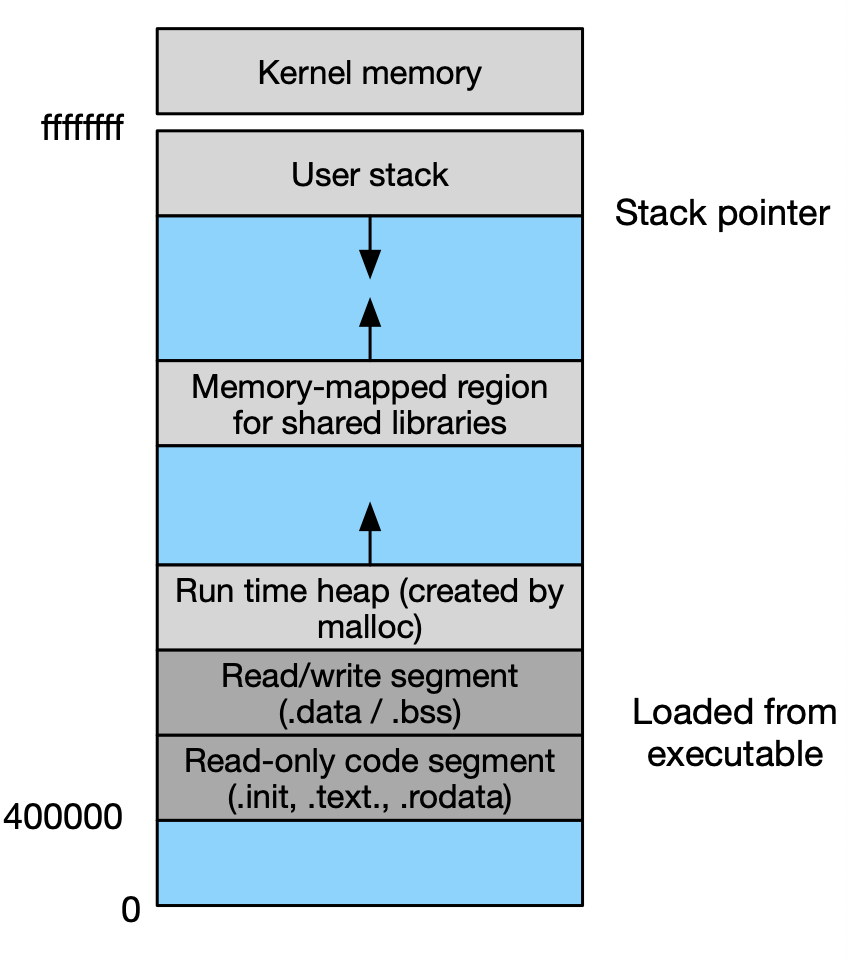
Virtual memory is the abstraction of physical memory.
Its purpose is to insulate the memory of each process, create the appearance of more available memory than physically exists (DRAM), and to handle disk caching/loading.
- The OS kernel desides which physical memory the virtual memory map to.
- When you're reading bytes of data from a file, it is very likely you will continue to access that file. Based on this idea, we will get data from a storage device into memory before it is accessed by your program in order to cache data and increase speed.
The idea of virtual memory. It's a way of distributing physical memory to programs.
The mechanisms to implement virtual memory:
- Memory management unit (MMU) is a hardware component that takes each virtual address accessed by the CPU and translates it to a physical address or a page fault.
- Page table is a data structure that defines the set of virtual addresses to physical addresses. It's built by the OS kernel and used by the MMU. There is one page table per process.
Virtual Addressing
This concept is complex and closely tied with multi-tasking (multiple processes). This process is partly managed by hardware and partly by software.
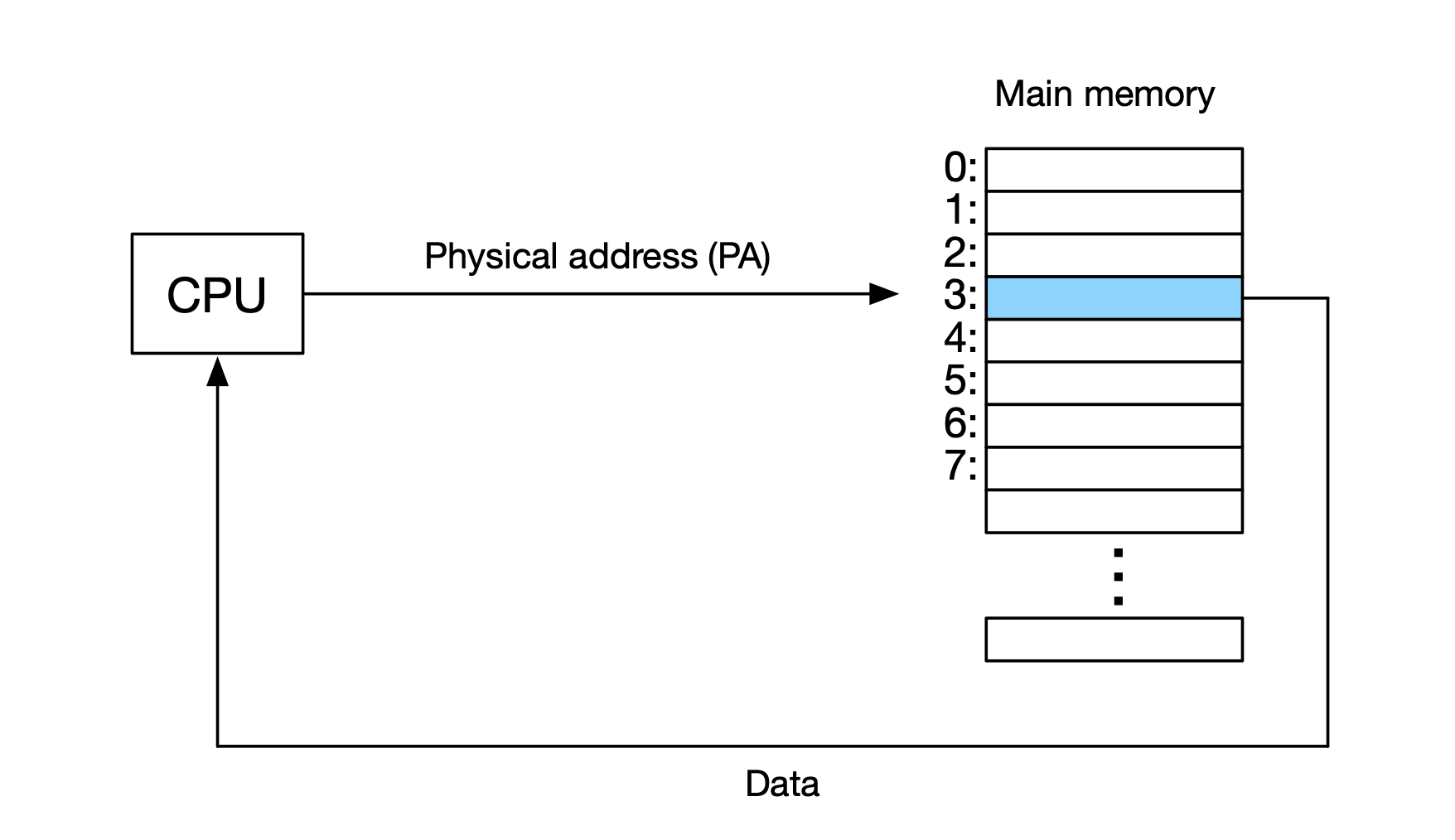
In the most basic design, the CPU addresses physically memory directly, giving them a physical address (PA).
Now there's a MMU between a CPU and main memory. The CPU generates a virtual address and the MMU translates it to a physical address. Depending on which page table is being used, we get different translations. The page table is under the control of the OS Kernel.
A page is the unit of granularity between the virtual address to physical address. On x86, the page size is 4KB. The physical address space is much smaller than virtual address space typically. The working set (amount that of valid virtual pages) is typically much smaller than the total amount of valid pages.
Physically addressing is when assumed CPU addresses physical memory
Virtual addressing is when the memory management unit (MMU) maps virtual to physical addresses. csf_22_virtual_addressing.png
The address space has a few specificaitions:
- virtual memory size: N = 2^n bytes, e.g., 256 TB
- physical memory size: N = 2^m bytes, e.g., 16 GB
- Page (block of memory): P = 2^p bytes, e.g., 4KB
- The virtual address can be encoded in n bits.
Caching
Before, we talked about caching, but for the on-chip cache of DRAM memory. Now, let's talk about caching between RAM and disk. This is driven by a large virtual memory address space. We want to avoid unecessary and duplicate loading (like with DRAM).
- "Block" is parallel to "page"
- "Swapping" is parallel to "paging"
Mapping looks like:
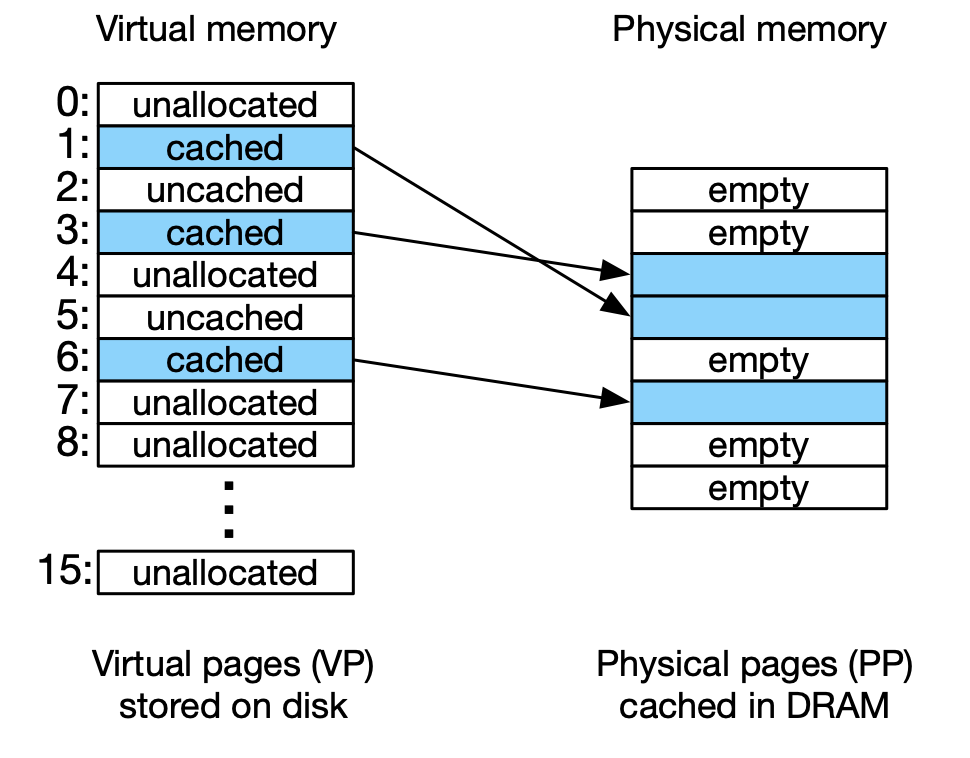
A virtual memory page can have one of these states:
- cached
- allocated page
- stored in physical memory
- uncached
- allocated page
- not in physical memory
- unallocated
- not used by virtual memory system so far
Page Table
Page table is an array of page table entries (PTE) (actually, a tree where the leaves store the page table entries)
- Each PTE maps a virtual page to a physical page
- Valid bit
- set if PTE currently maps to physical address (cahced)
- not set otherwise (either uncached or unallocated)
- A mapped address can be
- cached: meaning it has a physical address in DRAM.
- uncached: meaning it has a physical address on the disk.
A page table looks like this:
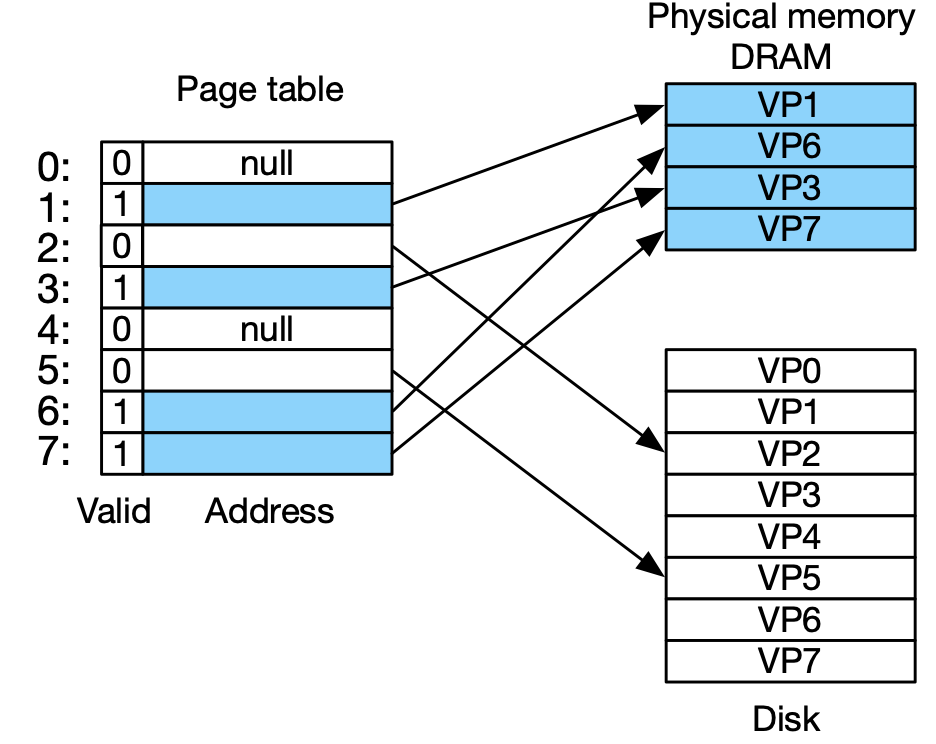
- Example of a page hit: virtual address points to 3, which has a valid bit. We now access VP3.
- Example of a page fault: virtual address points to 2, which has a valid bit = 0, so the page is not in RAM. We need to amke space in RAM. We pre-empt "victim" page (which is the current VP2), which is typically the out-dated cache page. We load the page into RAM, so now VP2 takes the place of VP6. We update the page table entry to valid bit = 1
Allocating Pages
What happens when we load a program? We will need ot load its executable into memory. This is similar to creating data objects when program is running ("allocating" memory)
To allocate,
- We identify a space in virtual memory
- We map that virtual address to the disk (called a "page file"). We don't actually load, we just create the page table entry to point to the disk. Then, we let the virtual memory system handle the loading.
Process Memory:
- Nothing loaded at startup
- Working set (or resident set)
- pages of a process that are currently in DRAM
- loaded by virtual memory system on demand
- Thrashing is when the memory actively required by all processes larger than physically available
- frequent swapping of memory to/from disk is very bad: slows down machine dramatically
Linked from Computer System Fundamentals