Networks
When you type a URL into a web browser, you get information. Well, how does this process work?
Networks
Networks allow communication between computers.
- Applications: access remote data, share information, everything can communicate over the Internet now
Hardware Layer
A network interface is a computing device that allows it to connect to a network.
- Wired: ethernet, Infiniband (for high-performance applications)
- Wireless:
802.11(wifi), cellular modem
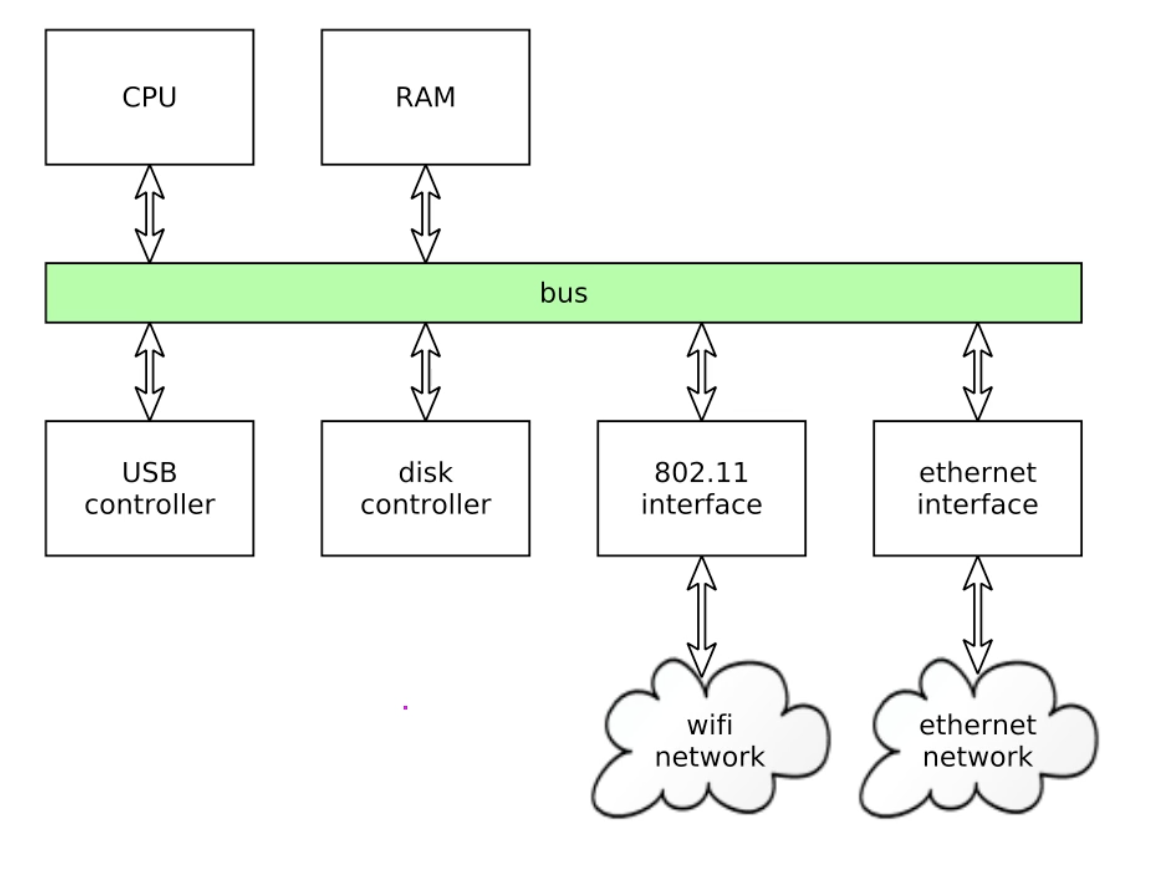
To the computing device (the "host"), the network interface is just a peripheral device (think disk controller, USB controller, etc.).
The OS can request to send data out to the netowork, and the network interface device notifies host CPU when data arrives from the network (possibly by raising a hardware interrupt).
Network interface example:
Software Layer
A protocol stack is also needed to allow network applications to communicate over the attached network interface(s). They define how communication works at different layers. It is a "stack" because network protocols are layered:
- application protocol (e.g., HTTP, messages):
- transport protocol (e.g., TCP, packets): transport data from one application to another.
- network protocol (e.g., IP, datagrams): routing defines how you identify systems that are connected in a network. How does your computer identify the web server? How does the message get to the remote system named by the address.
- link layer protocol (e.g., ethernet, frames): encodes/decodes higher level data in a form that prepares it for physical transmission.
- physical layer protocol (e.g., ethernet over CAT6 twisted pair, signals)
Application layer are user processesl; transport, network, and link layer are the responsibilities of the OS kernel; physical layer is literally the electrical signals.
- The "ethernet protocol" literally encodes the data for transport over ethernet.
There are a few issues that arise:
- How are differing network technologies interfaced to each other?
- How are devices and systems identified on the network?
- How is data routed to the correct destination?
- What APIs do netowrk applications use to communicate?
Network Security is an important topic. Since the idea of networking is to provide access to information and computing resources from anywhere, it leaves areas of exposure to malicious actors. We want to controll access so that only authorized agents are permitted to access data and services.
- When implementing and deploying networked systems and applications, we must think carefully about what the security requirements are, and whether the system meets them.
TCP/IP
TCP/IP is a suite of internetworking protocols.
- "Internetworking" = connecting lots of physical networks together, including when they use different technologies or protocols.
There are two versions:
- IPv4 has 32 bit addresses, widely deploeyd
- IPv6 has 128 bit addresses, not as widely deployed (but significant adoption in mobile networks)
This protocol is ubiquitous; if you are using a network, you're using TCP/IP.
- The scale of global TCP/IP internet is immense (billions of communicating devcies)
IP
IP = Internet Protocol.
This is the underlying network protocol in the TCP/IP protocol suite. It is an unreliable protocol: when a datagram is sent, it might not reach the recipient.
All data is sent and received using IP datagrams (fixed-sized packets of data sent and received using IP address to indiciate source and destination) .
Transport protocols (TCP, UDP) are layered on top of IP.
- E.g., a TCP connection consists of IP datagrams containing TCP data in order to add reliability.
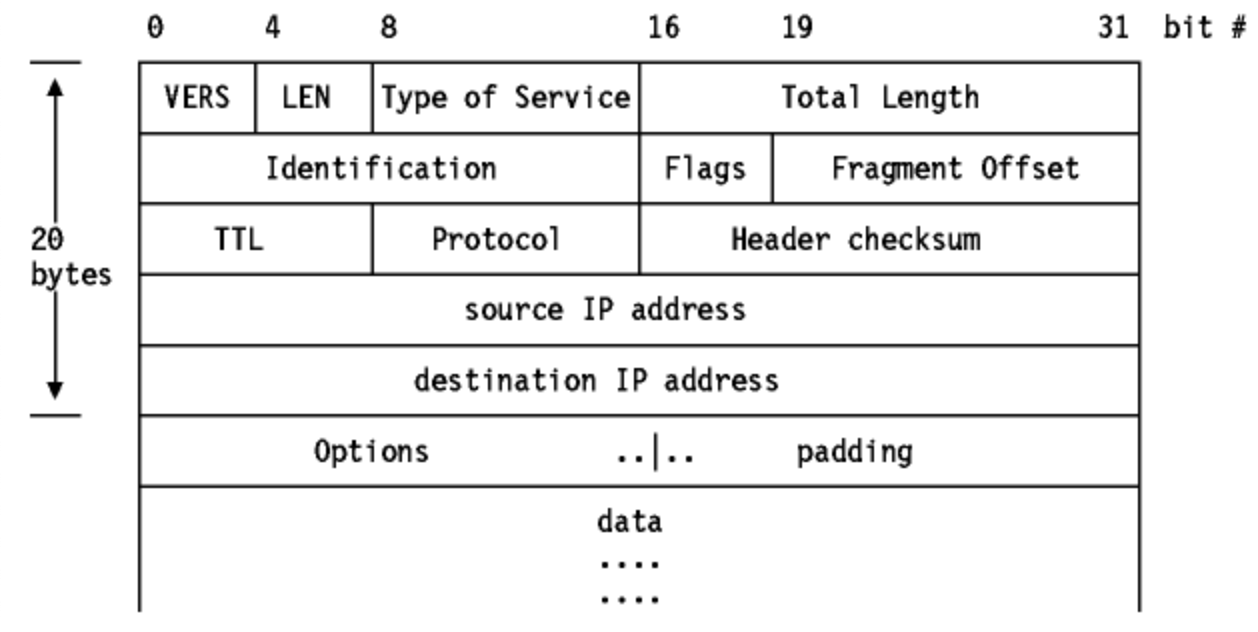
An IP datagram format:
- Discrete chunk of data sent through the network
- Consists of a header (encodes information needed to route the data and what to do with the data) followed by data
- May be fragmented and reassembled.
- The protocol field indicates which transport protocol is being used.
TCP
TCP = "Transmission Control Protocol"
This is a connection protocol layered on top of IP. (Protocol field value is 6). It is a reliable protocol. If any data is lost en route, it is automatically resent.
TCP allows the creation of virtual connections between peer systems on a network. A connection is a bidirectional data stream (each peer can send data to the other).
- The connection can be closed (think hanging up when the phone call ends)
TCP guarantees data to be delievered in the order sent.
UDP
UDP = "User Datagram Protocol"
It's a datagram protocol layered onto of IP (Protocol field value is 17).
It adds the ability to identify which application you want your data to go to. It is not connection-oriented: data can be receieved in any order, no fixed duration of conversation (more analogous to sending a letter than talking on the phone).
It is unreliable: data sent may not be receieved.
Used in applications where minimizing latency is important, and data loss can be tolerated.
Routing
Routing: how does data get to its destination?
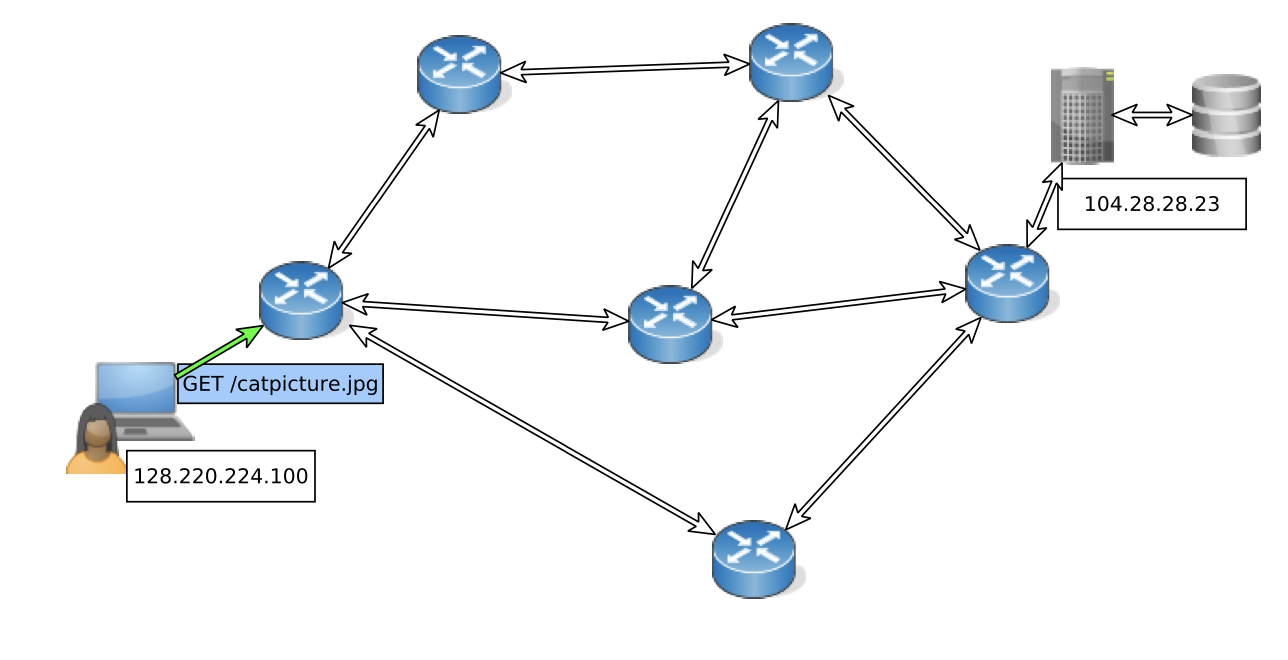
- There is a network with client, server, and intermediate routers
- The client sends request to server: packet sent on default route (user's computer has only one network interface).
- The router has a choice of outgoing links on which to send the packet. It chooses which outgoing link based on routing table.
- Each router has a routing table specifying which link to use based on matching the network part of destination address.
- Routing algorithms try to deliver packets efficiently, to avoid routing loops.
- After hopping between routeres, the packet is delivered to the server. The server's response will be delivered back to the client in a similar manner.
Imagine if A and B both send a packet to D at the same time, but they both need to go through C to reach D. IP is unreliable because an outgoing link (C to D) can only carry one of two packets.
- Solution: queuing. Router C will have a queue of unsent packets to be forwarded to D. Either A's or B's packet must wait in queue.
- Still poses a problem because outgoing link C to D may not be able to handle aggregate data rate of incoming data. Because the queue of packets must be finite, C discards packets to D when the queue is full.
- TCP notices that packages are dropped, so the sender will adapt and slow down the send rate.
Dropped packets are a necessary consequence of finite capacity links and finite queues.
- How TCP knows that there are package dropped is because TCP requires acknowledgement of data sent, so no acknowledgement --> assume packet dropped, retransmit.
Addressing
The problem of how we name a system to which data can be sent.
There are two kinds of addresses:
Network address: address of a network interface within the overall internet (e.g., IPv4)
- Used to make routing decisions at the sacle of the overall internet
- a router makes routing decisions based on a network address
Hardware address: a hardware-level address of a network interface (e.g., ethernet MAC address).
- Used to deliver a data packet to a destination within the local network.
- a switch makes routing decisios based on a hardware address
Linked from Computer System Fundamentals