Wireless Networks
Elements of a wireless network:
- wireless hosts (laptop, smartphones that run applications) can be stationary (non-mobile) or mobile.
- base station: typically connected to wired network. Relay: responsible for sending packets between wired network and wireless host(s) in its area (e.g., cell towers, 802.11 access points (AP)).
- wireless links: typically used to connect mobile(s) to base station. Also used as backbone link. Multiple access protocol coordinates link access. Various data rates, transmission distance.
Wireless vs mobile: wireless networks deal with communication over wireless links. Mobility deals with handling mobile users that change point of attachment to network.
- non-wireless networks may also have to deal with mobility issues
- handoff is when the mobile changes base station providing connection into wired network.
Wireless Links
Characteristics of wireless links:
- data rate
- range
- decreased signal strength: radio signal attenuates as it propagates through matter (path loss).
- multi path propagation: radio signal reflects off objects ground, arriving ad destination at slightly different times. The signals bounce off the surface and interfere with one another. Self-interference.
- interference from other sources: standardized wireless network frequencies (e.g., 2.4 GHz) shared by other devices (e.g., phone); devices (motors) interfere as well
- broadcast medium: anybody in proximity can hear and interfere.
- Cannot receive while transmitting. Our own (or nearby) transmission is deafening to the receiver (half-duplex). Recent work has shown that full duplex may also be possible.
- Signals sent by sender don't always end up at receiver intact.
- multiple wireless senders/receivers create many problems. Multiple access issues (seen this issue before with the multiple links, see Collision Detection). Hidden terminal problem. We have a shared medium.
The last three characteristics make communication across (even a point-to-point) wireless link much more difficult
Many different protocols that support different criteria. The indoor ones are named "802...".
- created in February 1980 (that's why it starts with 80) and then 11 is for November.
There are two modes of operation
- Infrastructure mode: base stations connect mobile to wired networks
- Ad-hoc mode: no base station. Nodes can only transmit to other nodes within link coverage (point to point connection). The nodes will organize themselves into a network and route among themselves.
- you'll need protocols to find a route between the hosts when they aren't within direct range. These are out of scope of this class.
Wireless network taxonomy
| Single Hop | Multiple Hops | |
|---|---|---|
| Infrastructure (e.g., APs) | Host connects to base station (WiFi. WiMAX, cellular), which connects to larger internet | Host may have to relay through several wireless nodes to connect to larger intern: e.g., mesh net (don't connect to base station- instead connect to the nodes in between) |
| No infrastructure | No base station, no connection to larger internet (bluetooth, ad hoc net) | No base station, no connection to larger internet. May have to relay to reach other given wireless node. E.g., MANET, VANET |
Bit Errors
Dealing with bit errors. In wired links, most loss is due to congestion. While in wireless links, there is higher, time-varying bit error rate (BER). To address high wireless bit error rates:
- sender could increase transmission power. Needs high energy (so bad for battery-powered hosts) and creates more interference with other senders.
- stronger error detection and recovery. More powerful error detection/correction code. Link-layer retransmission of corrupted frames.
- many TCP alternatives/extensions for wireless. TCP Westwood uses Explicit Loss Notification (ELN) to differentiate between the different errors.
802.11
802.11 wireless LAN (aka WiFi)
- many variations: 802.11b, 802.11a, 802.11g, 802.11n
- all use CSMA/CA for multiple access
- all have infrastructure and ad-hoc mode
802.11 LAN architecture:
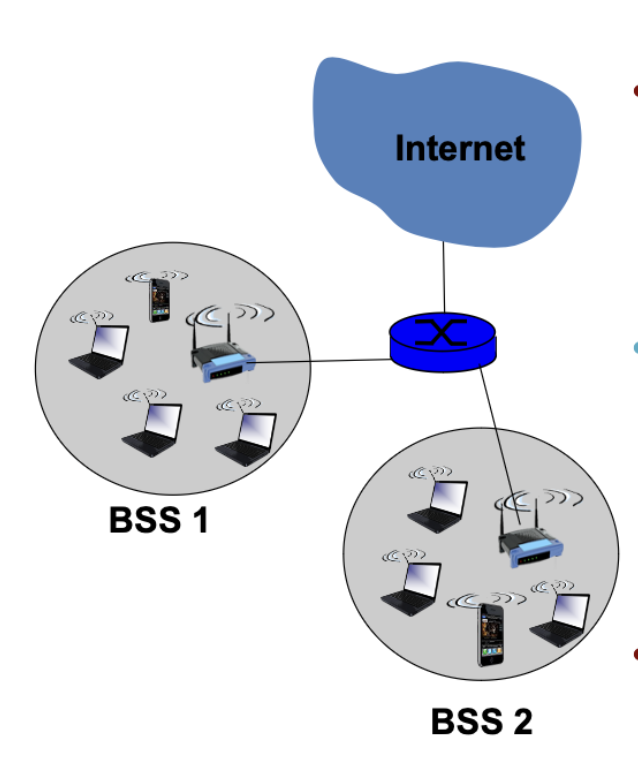
- wireless host communications with base station (= access point (AP))
- basic service set (BSS) (aka "cell") in infrastructure mode contains wireless hosts and access point (AP): base station.
- Ad-hoc mode: hosts only
- Designed for limited area
- AP is set to specific channel. Broadcast beacon messages with SSID (Service Set Identifier) and MAC address periodically.
- Hosts scan all the channels to discover the AP's. Host associates with AP. (E.g., this is why when you look at your wifi settings, you can see all the different beacons that the different APs send. You can see its MAC address, SSID) When you want to associate, you send them an association request to let them know- they must respond to the association request so that both are aware.
802.11 multiple access.
- 802.11 CSMA: sense before transmitting. Don't collide with ongoing transmissions by others.
- 802.11 has no collision detection.
- difficult to receive (sense collisions) when transmitting due to weak received signals (fading)
- can't sense all collisions in any case: hidden terminal, fading (as they propagate, so we aren't even sure wee can detect all the signals in the medium)
- avoid collisions using CSMA/CA (collision avoidance).
CSMA/CA
Basic collision avoidance: when a collision is inferred, retransmit with binary exponential backoff (like Ethernet)
- use ACK from receiver to infer "no collision"
- use exponential backoff to adapt contention window
CSMA/CA:
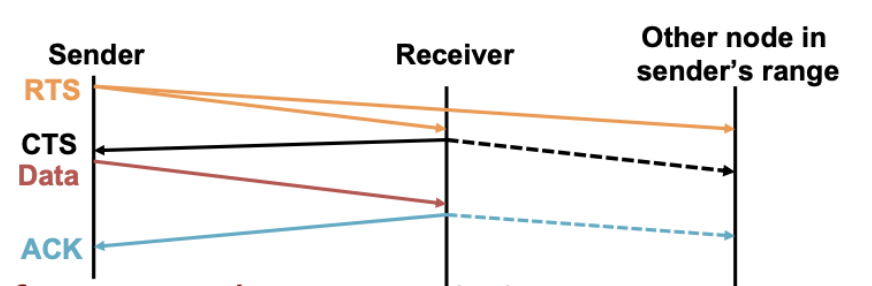
- before every data transmission:
- sender sends a Request to Send (RTS) frame with the length of transmission and destination
- Receiver responds with Clear to Send (CTS) frame
- Sender sends data
- Receiver sends an ACK
- If sender doesn't get a CTS back, it assumes collision.
More on RTS/CTS. The control messages are very small. It works by reserving the channel using short frames before transferring much longer DATA frame.
- By reserving the channel explicitly, we enable avoidance.
- This is required to avoid hidden terminals because hidden terminals will hear CTS from the receiver. In this case, imagine A and C can't see each other, but both send to B. RTS/CTS can help because both A and C would send RTS to B. B would see one of them first, so B will respond with only one CTS (let's say it echo's A's RTS first). C detects that the CTS sent by B doesn't match, so it won't send.
Hidden Terminal Problem
Hidden terminal problem: B, A hear each other. B,C hear each other. However, A,C can not hear each other. Hence, A, C are unaware of their interference at B. 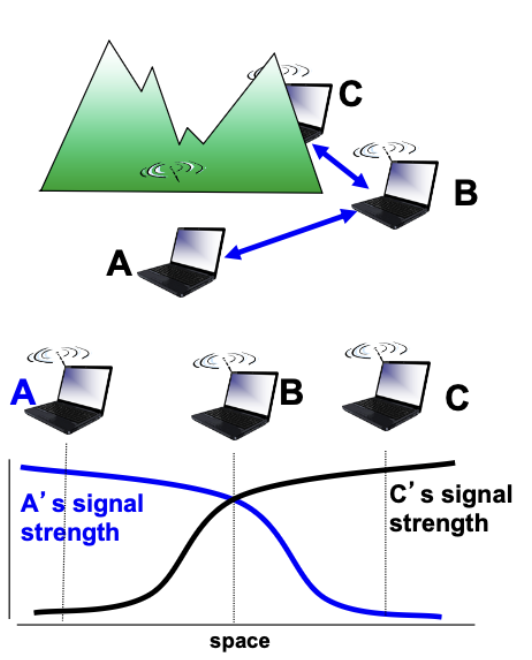
- This is solved via RTS/CTS because both A and C will both send an RTS to B. B will respond with a CTS, which will be received by both hosts A and C. However, only one would detect a match, which is the only one that it will communicate with.
Exposed Terminal Problem
-
B sends to A, C wants to send to D.
-
As C receives B's packet, carrier sense wouldn't prevent it from sending to D, even though it wouldn't interfere.
-
The purpose of RTS is to make sure no one else in the domain talks. However, since A is far from C, C will hear the RTS from B, but won't hear from A.
-
RTS/CTS will help
- C hears RTS from B, but not CTS from A.
- C knows it's transmission will not interfere with A
- C is safe to transmit to D
In summary:
- wireless networking introduces more challenges than wired networks because of interference, attenuation, multi path, hidden terminals, etc.
- CSMA/CD doesn't work because collision detection is difficult. So they use CSMA/CA instead to avoid collisions by reserving the channel prior.
Linked from Computer Networks